









gmp-validation

E-Signature Compliance: A Core Functionality of BizPortals QCFlow

Digitally sign your documents, reports, and forms to streamline your approval workflow, enhance security, and ensure e-signature compliance with the industry regulations.

How Our E-Signature Feature Simplifies Your Workflows

Easy Draw and Upload

Sign your documents quickly without the need for printing, scanning, or manually handling the physical paperwork.

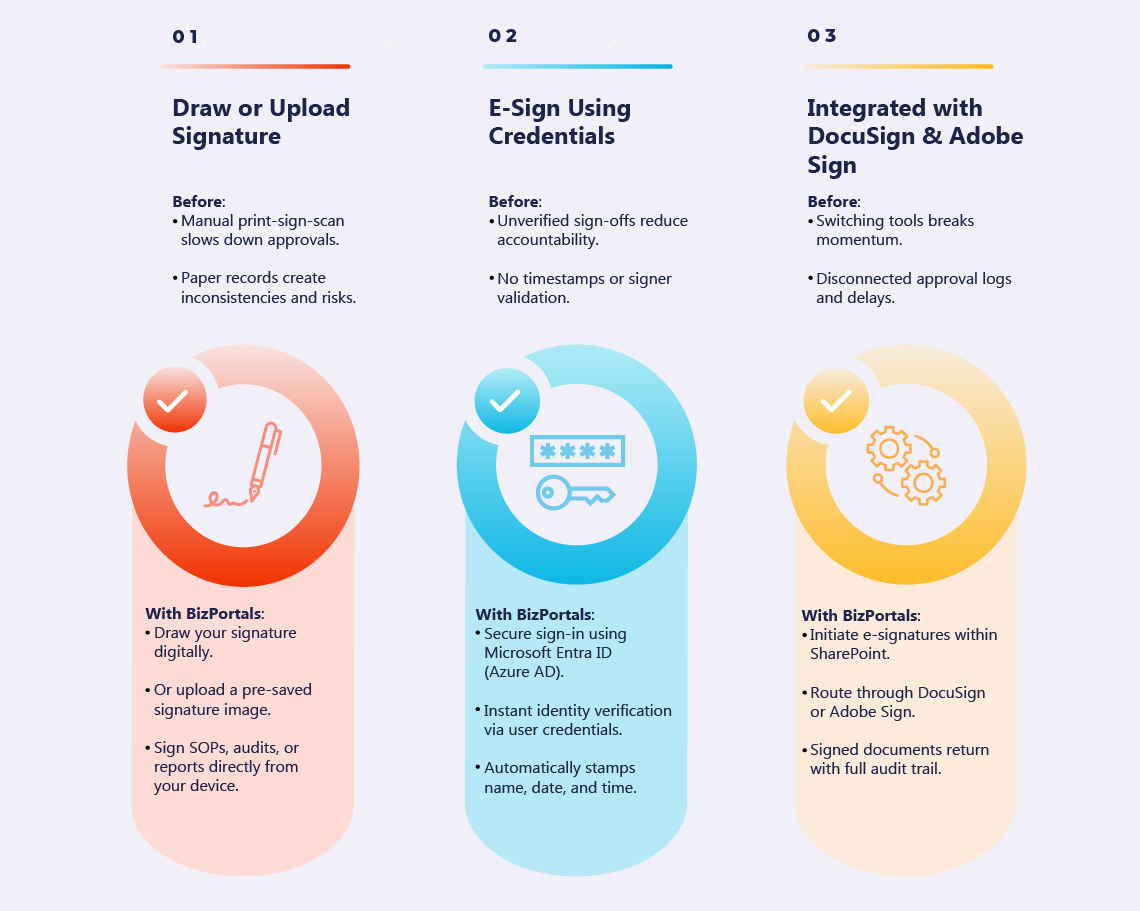
BizPortals QCFlow allows users to simply draw or upload the image of their signatures digitally while reviewing or approving standard operating procedures (SOPs), reports, guidelines, or regulatory submissions. This electronic signature system helps organizations maintain internal quality standards and ensure regulatory compliance.

Simply click on ‘Signature’ to sign the documents. You can either click on ‘Draw’ to sketch your signature manually or click on ‘Upload’ to choose an image of your signature from your device’s library.

Quickly E-Sign with Credentials

BizPortals QCFlow, a QMS Software powered by Microsoft 365, offers streamlined user access and role management which can be leveraged to secure document approval and reduce e-signature bottlenecks.

With integrated Azure Active Directory/ Microsoft Entra ID, users’ credentials can be used to efficiently ensure that the person signing the document is who they say they are, providing legal validity required for e-signature compliance.

To sign the document, click on ‘Signature,’ enter your credentials, and you’re done. Your e-signature, along with the date and time stamp, will appear on the screen.

Integration with DocuSign

Integration with DocuSign

Allow your quality teams to seamlessly e-sign documents without leaving the SharePoint environment, creating a smoother operational workflow.

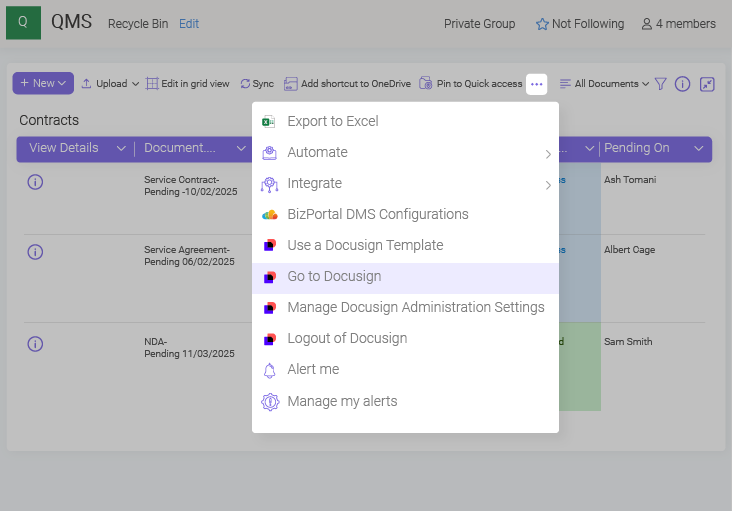
To enhance your document approval and signing process, BizPortals QCFlow offers integration with third-party electronic signature platforms like Docusign and Adobe Sign.

Simply initiate the e-signature process using the integrated application. The document is sent for signature and, once completed, is returned with an audit trail for secure storage.

Sign Instantly with OTP Verification

Skip the hassle of remembering complex passwords or handling physical signatures. BizPortals QCFlow now offers a secure, OTP-based e-signature method for quickly approving critical documents and maintaining compliance across regulated processes. Users can receive a one-time password directly in their email, ensuring that only authorized individuals can sign documents. This method adds an extra layer of security and represents an advance electronic signature approach suitable for teams spread across locations. To sign a document, simply click on ‘Sign,’ confirm your identity, enter the OTP sent to your email, and complete your e-signature with a single click.
Ensure Compliance Across All Quality Processes

Extend e-signature compliance into audits, CAPA, training, and more

Streamlining E-Signatures with BizPortals QCFlow – Example from Automotive Component Manufacturing

Electronic signatures play a vital role in regulated industries where speed, traceability, and compliance are critical. To better understand how BizPortals QCFlow streamlines the e-signature workflow, let’s walk through an example from the automotive component manufacturing industry.
Streamlining E-Signatures with BizPortals QMS – Example from Automotive Component Manufacturing

From regulatory compliance to internal approvals, QMS software simplifies e-signatures, enabling faster, more secure document workflows across departments.

The Key Benefits of E-Signature with BizPortals QCFlow

Real-Time Tracking

Real-Time Tracking

Get real-time tracking of document status and approval workflows, enhancing visibility into the processes, decisions, and follow-ups.

Audit Trails

Audit Trails

Access a complete history of who signed the document and when they signed it, along with any changes made in the document in the process.

Reduces Manual Errors

Reduces Manual Errors 

Incorrect signatures, misplaced documents, or errors in the signing process, eliminate them all with an integrated e-signature feature.
Improved Collaboration

Improved Collaboration

Allow multiple stakeholders to effortlessly review, approve, and e-sign documents without being in the same room or even in the same time zone.

Lowers Operational Costs

Lowers Operational Costs

E-signature eliminates the need for paper, printing, stamping, and physical storage, cutting down the material expenses and administrative overheads.

Data Security & Integrity

Data Security & Integrity

BizPortals QCFlow offers features like version control, role-based access, and audit trail, ensuring document security and integrity throughout the signing process.
Zip Doc

Documentation and Traceability

Right from detecting issues to executing corrective and preventive actions, each stage is documented and records stakeholders’ actions, providing a clear audit trail for inspections.
Faster Decisions, Quicker Execution

Faster Decisions, Quicker Execution

Reducing the time spent on manual document processing, the e-signature feature can significantly accelerate your quality management workflow.
Compliance with Regulations

Compliance with Regulations

The e-signature feature can be tailored to meet your internal policies and industry-specific regulatory requirements, ensuring secure and compliant electronic approvals.
Seamless User Experience

Seamless User Experience

The intuitive and easy-to-use interface allows your quality teams use e-signatures with minimal or no training, ultimately improving adoption rates, onboarding, and productivity.

Zip Doc

Documentation and Traceability

Right from detecting issues to executing corrective and preventive actions, each stage is documented and records stakeholders’ actions, providing a clear audit trail for inspections.
Say Goodbye to Paperwork—Sign Digitally with BizPortals QCFlow

Free QMS buyer's guide

Choose the right QMS for compliance & efficiency

ewp iso
iso-2700