An Integrated Training Management System for Smarter Compliance

More than just a training management module, BizPortals QCFlow connects employee learning with document control, CAPA, and other quality processes.
An Integrated Training Management System for Smarter Compliance

What is a Training Management System?

A digital software for training management helps centralize training data and effectively organize, automate, and track employee training within the organization. It ensures that their workforce is adequately trained and compliant with prevalent industry standards, regulations, and internal quality policies.

Training management, while essential in highly regulated industries, such as pharmaceuticals, medical devices, and food production, is also a requirement under various international regulations focused on operational excellence and risk mitigation. However, BizPortals QCFlow, by offering a centralized, collaborative, and customizable platform to manage employee training processes helps organizations create a more engaged and competent workforce.

Why Choose BizPortals QCFlow for Training Management

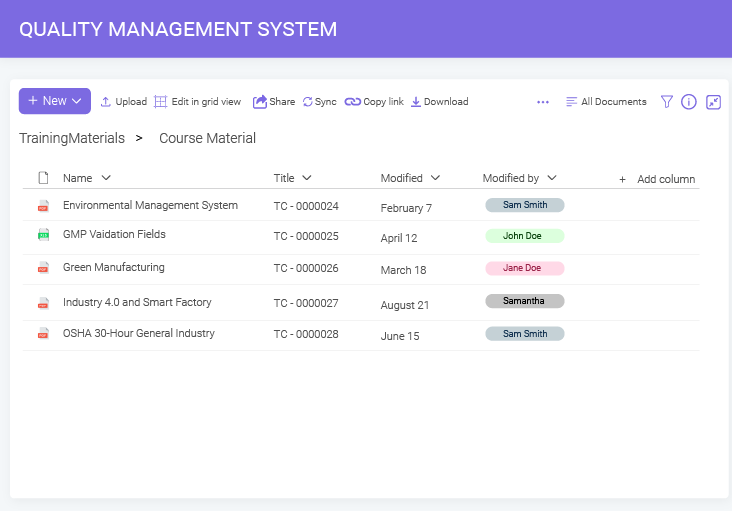
Consolidate all your training materials, records, and certifications in centralized and secure dedicated libraries with metadata integration, audit trails, and versioning for hassle-free audits, compliance, and overall workforce management.
Centralized Training Management

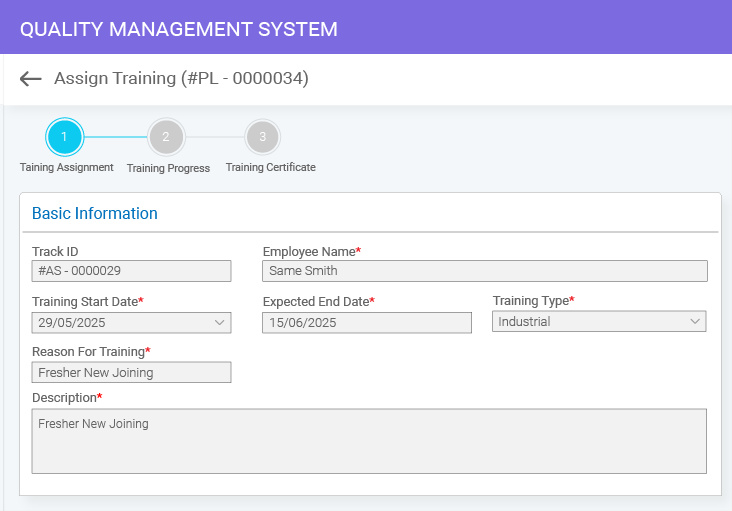
Eliminate the need for manual intervention with automated training workflows offered by BizPortals QCFlow. Leverage automated workflows for training-related reviews, approvals, notifications, and reminders to save time and reduce costs.

Automated Training Workflows
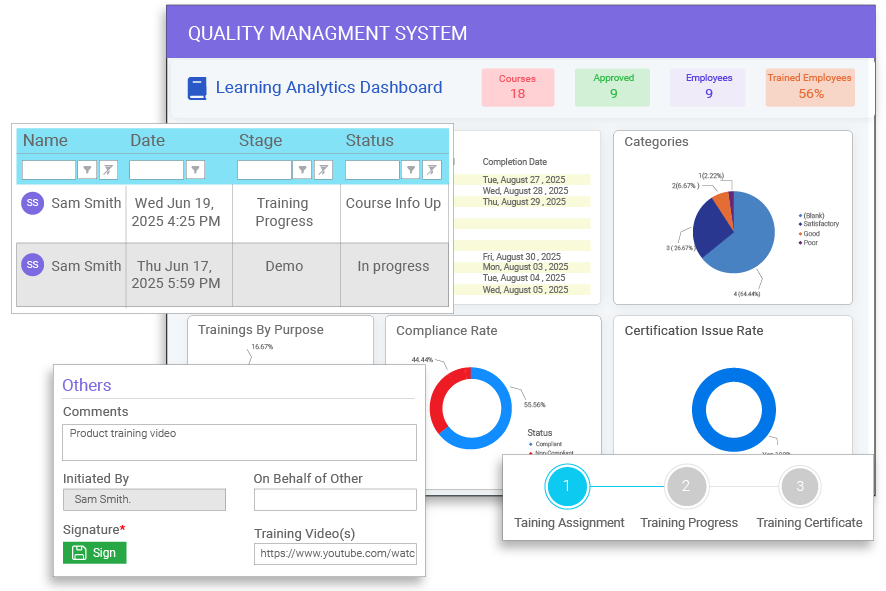
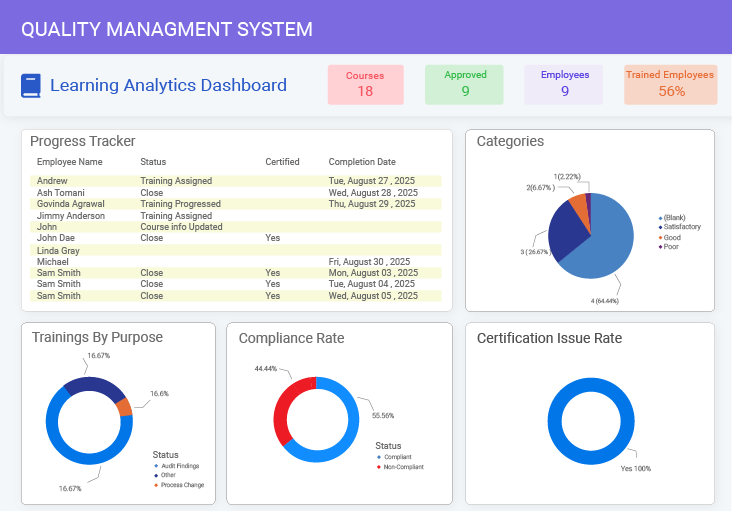
From employees’ training status and certification to course catalog and upcoming training deadlines, get a holistic view of the overall training process with a dedicated training dashboard for better allocation of resources and informed decision-making.
Real-Time Training Insights
Use cross-module integration to allow seamless dataflow and connectivity across departments and cross-functional teams, share training materials, and sync training data with compliance tracking for enhanced productivity and visibility.
Seamless Team Collaboration
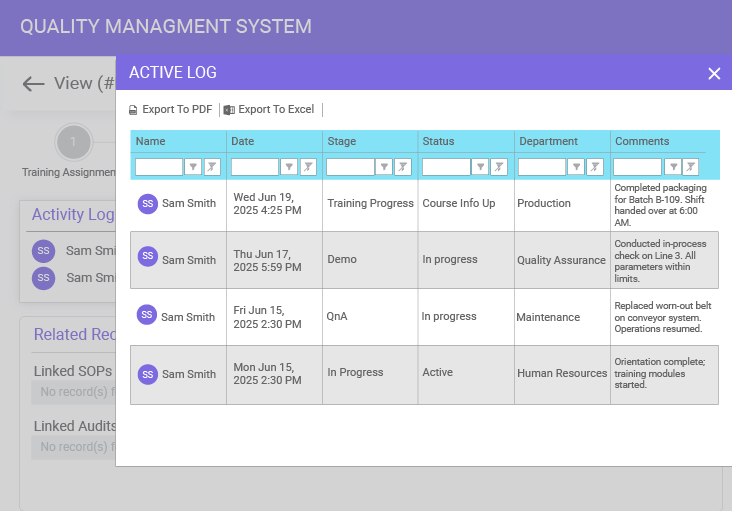
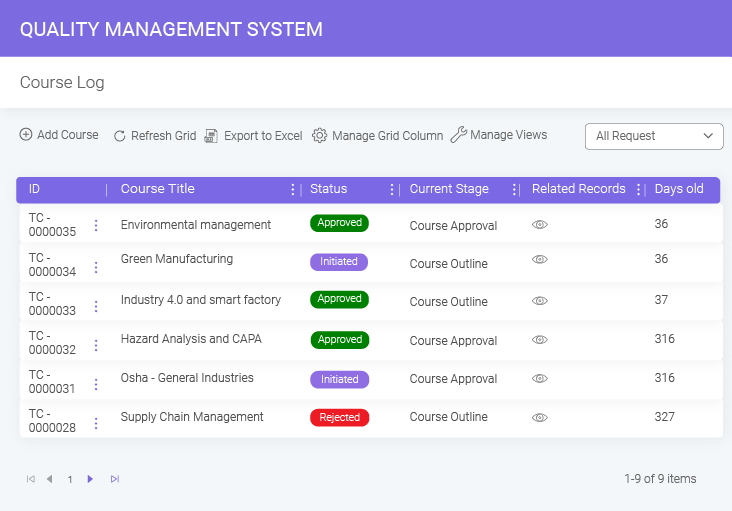
BizPortals QMS provides detailed training logs, offering access to key details like progress, remarks, completion dates, and certificates with e-signatures, giving a complete view of training history, ensuring compliance, and promoting employee development.

Comprehensive Training Log

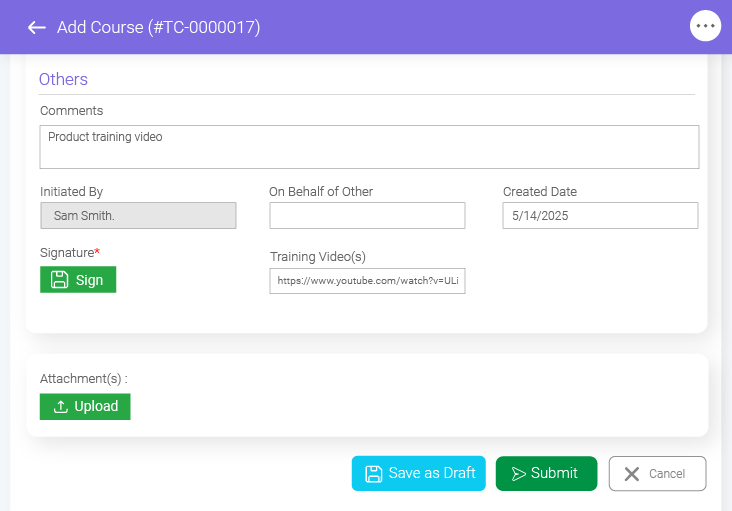
Ensure the security and compliance of your training records with the e-signature feature. With a digital training management system, get tamper-proof certificates, audit trails, and timestamps for enhanced operational efficiency and legal standing.

Secure Digital Signatures
Streamline your training management process with a fully configurable solution that offers tailored training workflows, custom reporting templates, role-based access, compliance integration, and more, ensuring the highest quality standards.

Configurable Training Solution
See How It Works in Real Life
Experience how BizPortals QCFlow simplifies training and compliance

Key Benefits of Using a Digital Software for Training Management

Ensures Compliance with Standards

Ensures Compliance with Standards

Proper employee training ensures that they are well-versed in the relevant laws, industry regulations, and internal policies, follow correct procedures, and understand their role in maintaining these standards.

Enhances Quality Awareness

Enhances Quality Awareness

Training enhances quality awareness across all levels of the organization and helps employees understand the impact of their actions, resulting in a more proactive and engaged workforce that strives for excellence.

Reduces Reworks and Risks

Reduces Reworks and Risks

A well-structured training program helps improve employees’ skills and knowledge and equips them with tools to perform tasks efficiently, eventually mitigating the potential risk of errors or inconsistencies, leading to costly reworks.

Improves Customer Satisfaction

Improves Customer Satisfaction

Training enhances customer satisfaction by improving employees' understanding of customer needs, product knowledge, and problem-solving skills, ensuring high-quality service and fostering loyalty and retention.

Standardizes Processes and Practices

Standardizes Processes and Practices

Training standardizes processes, ensuring consistent quality, reducing errors, improving efficiency, and making it easier to onboard new employees, ultimately enhancing product consistency and operational scalability.

Documentation and Traceability

Right from detecting issues to executing corrective and preventive actions, each stage is documented and records stakeholders’ actions, providing a clear audit trail for inspections.

How Training Management System in BizPortals QMS Works: A Complete Process Flow

Identifying Training Needs

Identifying Training Needs

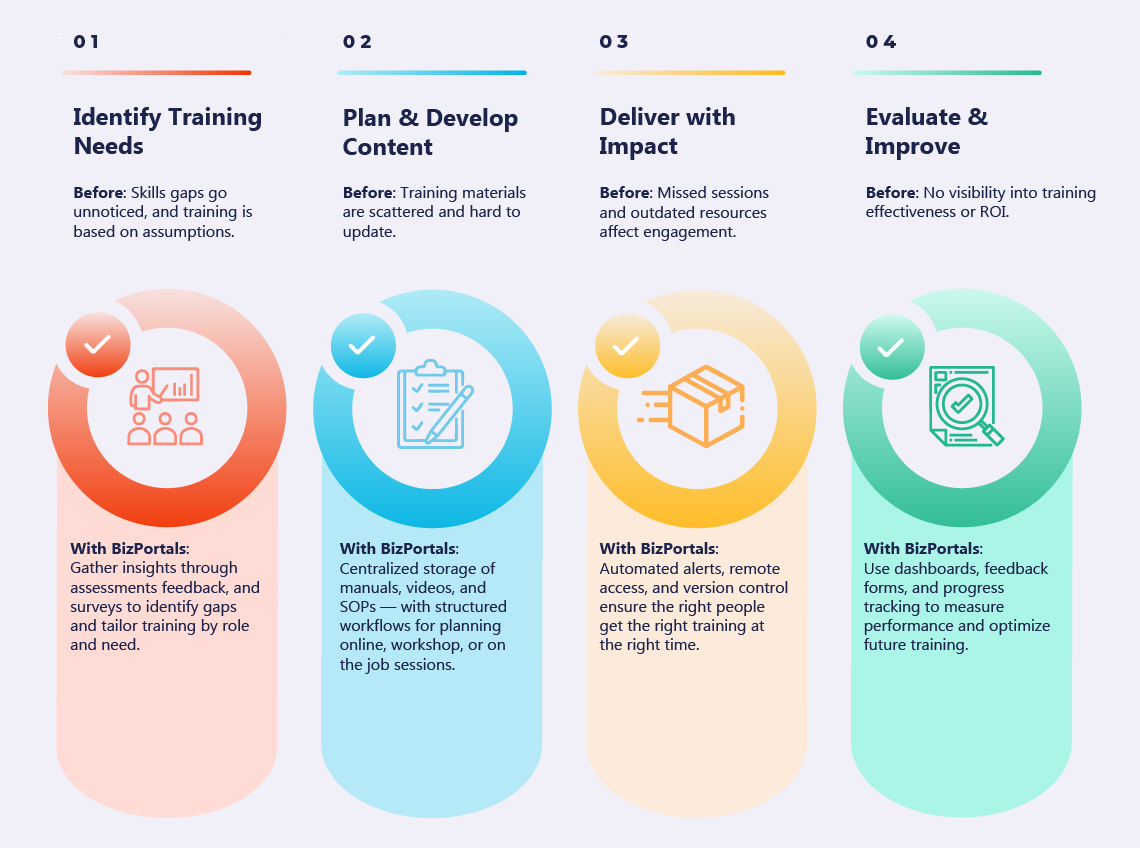
Identifying the skills gap within the organization is the first step. BizPortals training management system software pulls data from different departments, highlighting employee performance, assessments, and feedback. You can leverage customized surveys and forms to assess skills gaps, generate reports, and create more targeted training programs to improve technical skills, leadership capabilities, and compliance training.

Plan and Develop Training

A well-designed training program keeps employees engaged and up to date, ensuring a competitive edge in the market. BizPortals training management module, by offering centralized, secure, and accessible content storage, allows stakeholders to include different training methods like online courses, workshops, and on-the-job training by providing step-by-step instructions, guidelines, manuals, and mentorship sessions.

Implement and Deliver Training

Effective and timely deliverance of training defines the overall learning experience. With automated training workflows with added alerts feature to send automated email invites, reminders, and updates regarding the training sessions, remotely accessible resources, and role-based access, the BizPortals training management features ensures the right people can access the most updated versions for impactful and engaging learning experiences.

Evaluate and Track Training

Evaluate and Track Training

Regularly auditing and tracking training data helps identify gaps, ensures consistency, optimizes resource allocation, and fosters continuous improvement. BizPortals QMS, with dedicated training dashboards, custom feedback forms, and automated reporting, allows decision-makers to effectively evaluate key performance metrics, monitor individual or team progress, and evaluate the effectiveness of each program.

Continuous Improvement

Continuous Improvement

Training is not a one-time event; it must constantly be updated with the recent compliance changes and evolving business needs. While BizPortals QMS offers versioning to ensure your employees access to the most updated versions, it also helps employees, trainers, and subject-matter experts engage in a collaborative space to immediately respond to training queries or create customized learning paths for individual or collective needs.

How Training Management System in BizPortals QCFlow Works: A Complete Process Flow

1 Identifying Training Needs
2 Plan and Develop Training
3 Implement and Deliver Training
4 Evaluate and Track Training
5 Continuous Improvement

Identifying Training Needs

Identifying the skills gap within the organization is the first step. The training management system software pulls data from different departments, highlighting employee performance, assessments, and feedback. You can leverage customized surveys and forms to assess skills gaps, generate reports, and create more targeted training programs to improve technical skills, leadership capabilities, and compliance training.

Plan and Develop Training

A well-designed training program keeps employees engaged and up to date, ensuring a competitive edge in the market. BizPortals QCFlow's training management module, by offering centralized, secure, and accessible content storage, allows stakeholders to include different training methods like online courses, workshops, and on-the-job training by providing step-by-step instructions, guidelines, manuals, and mentorship sessions.

Implement and Deliver Training

Effective and timely deliverance of training defines the overall learning experience. With automated training workflows with added alerts feature to send automated email invites, reminders, and updates regarding the training sessions, remotely accessible resources, and role-based access, the training management features ensures the right people can access the most updated versions for impactful and engaging learning experiences.

Evaluate and Track Training

Regularly auditing and tracking training data helps identify gaps, ensures consistency, optimizes resource allocation, and fosters continuous improvement. BizPortals QCFlow, with dedicated training dashboards, custom feedback forms, and automated reporting, allows decision-makers to effectively evaluate key performance metrics, monitor individual or team progress, and evaluate the effectiveness of each program.

Continuous Improvement

Training is not a one-time event; it must constantly be updated with the recent compliance changes and evolving business needs. While BizPortals QCFlow offers versioning to ensure your employees access to the most updated versions, it also helps employees, trainers, and subject-matter experts engage in a collaborative space to immediately respond to training queries or create customized learning paths for individual or collective needs.

From Training to Total Quality
BizPortals QCFlow brings them all together in one place

How Different Industries Leverage BizPortals QCFlow’s Training Management System to Stay Skilled and Compliant

Training is the backbone of quality and safety across industries. To better understand the training management module, let’s look at an example from automotive manufacturing — where keeping assembly line workers, engineers, and inspectors up to date is essential for operational excellence and compliance.
How Automotive Teams Stays Skilled with BizPortals QCFlow

This example from automotive manufacturing shows how centralized QMS software powered by Microsoft 365 helps organizations streamline training, ensuring employees stay skilled, compliant, and aligned with fast-changing industry demands.

Digital Training Management Software vs. Manual Process: Side-by-Side Comparison

Key Aspect Manual Process BizPortals QCFlow (Training Management Software)
Accuracy & Reliability
Prone to duplication, loss, and human error
Eliminates errors with centralized, consistent data
Efficiency of Processes
Relies on manual effort, repetitive tasks
Automates scheduling, tracking, and reporting
Compliance & Accountability
Difficult to prove compliance, higher risk exposure
Provides audit-ready records and compliance tracking
Scalability & Consistency
Becomes chaotic and inconsistent as operations grow
Standardized processes easily scaled across the organization
Visibility & Control
Limited oversight, requires chasing updates manually
Real-time dashboards and status tracking for managers
Take the Next Step Towards Smarter Training
Get a personalized demo and see the difference firsthand

FAQs

What is training management software, and how does it work?
A digital training management system helps organizations plan, deliver, and track employee training. It enables you to centralize courses, records, and workflows, making training easier to manage and monitor across your organization.
A robust training management system ensures that the employees complete the required training on time, tracks certifications, and provides reminders. It helps organizations meet regulatory requirements, maintain compliance, and ensure their staff are always trained, skilled, and ready for audits or responsibilities.
No, the training management system is not standalone software. It comes as a dedicated module and is a part of BizPortals QCFlow. It integrates with other quality processes, such as document control, CAPA, and change management, creating a single, connected platform for your compliance and training needs.
Yes. The system empowers you to track employee certifications, skill levels, and training history in a secure, centralized environment. It provides complete visibility into who is trained for what compliance and what skills are missing.
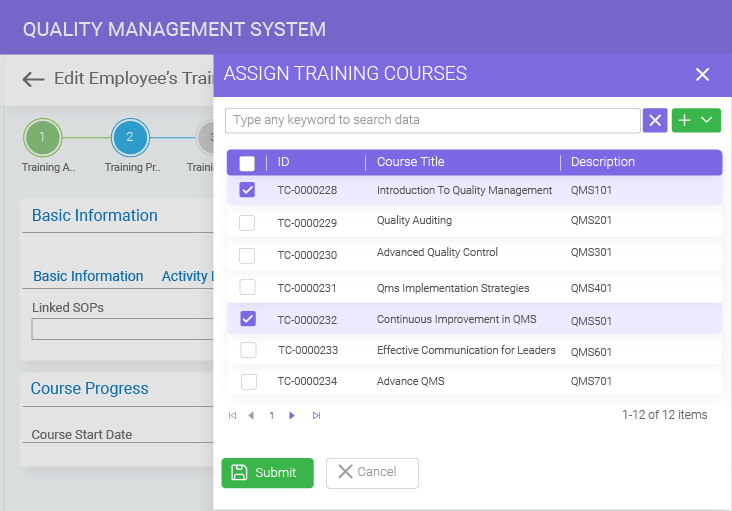
Yes. You can automate training by assigning courses based on role, department, or compliance requirements, or configure the workflows to meet your unique needs. You can also automate reminders to notify employees of upcoming deadlines or expirations, reducing manual follow-ups and ensuring training tasks are completed on time.
All training data is stored securely with role-based access controls, permissions, and compliance with enterprise-grade security standards. By this, you can make sure that only authorized users can access sensitive training records and employee information.
Yes. Managers can monitor training progress, view completion rates, and generate reports for audits or compliance reviews. You get an integrated dashboard that offers insights into employee readiness and overall training effectiveness across the organization.
Yes. The system is designed to scale with your business as it grows. It supports multiple teams, departments, and locations, ensuring consistent training delivery and compliance tracking across small companies or large global organizations.

Free QMS buyer's guide

Choose the right QMS for compliance & efficiency

ewp iso
iso-2700

BizPortals QMS Pricing

BizPortals QMS Pricing

BizPortals QMS Pricing