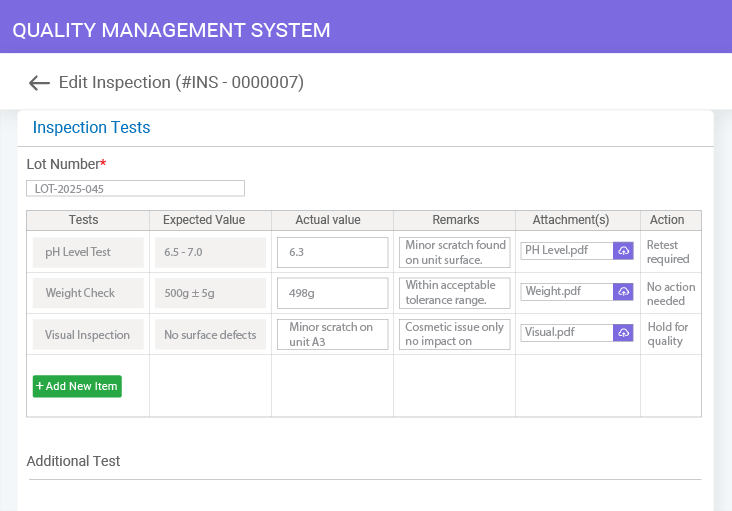
Smarter Inspection Management System for Quality and Compliance

From planning to continuous improvement, manage every step of quality inspections with ease using robust QMS software.
Smarter Inspection Management System for Quality and Compliance

What is Inspection Management Software?

Inspection management software helps organizations plan, schedule, conduct, track, and record inspections to ensure products, processes, and system meet quality and compliance standards. Simply put, it empowers quality teams to create multiple checkpoints into the quality management process, ensuring that your product or service consistently meets the highest quality standards before reaching the end-user.

Global regulatory frameworks and quality standards mandate robust inspection management to ensure product integrity, safety, and customer satisfaction. While well-structured and digital inspection management helps quality teams eliminate the risk of operational, financial, and safety-related losses, it also improves traceability and makes way for further process improvement and effectiveness.

Why Choose BizPortals QCFlow for Inspection Management?

Create pre-defined rules and logic to automatically initiate, assign, track, and escalate inspection-related tasks, approvals, and reviews to standardize how inspections are initiated and conducted across your organization.
Automated Inspection Workflows
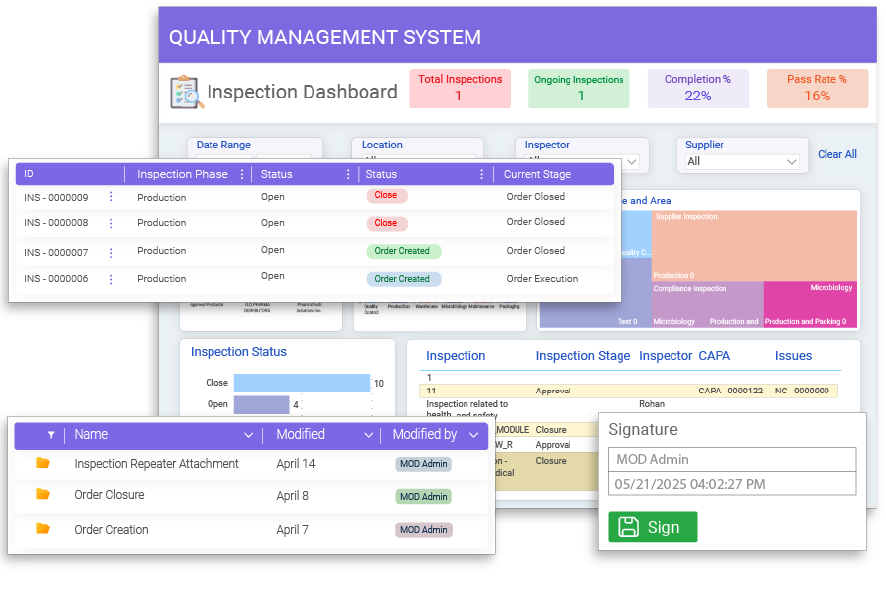
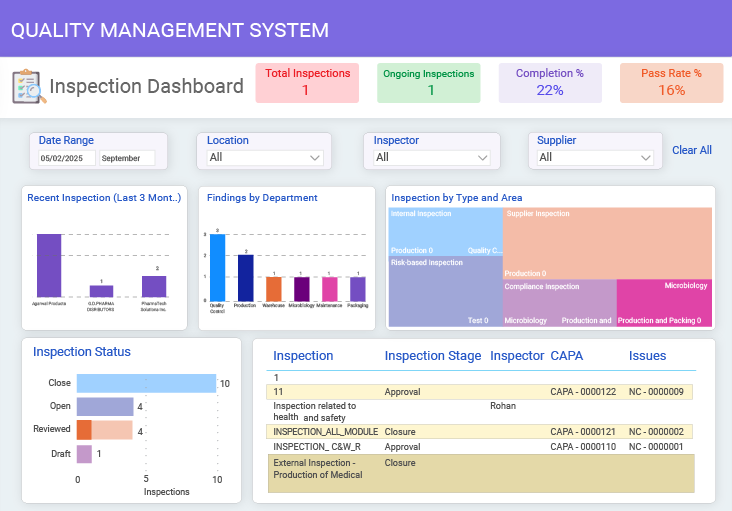
Get actionable insights into inspection data in visually interactive formats like graphs and pie charts to easily identify recurring issues, high-risk areas, or incidents for improved visibility and data-driven decision-making.
Interactive Inspection Dashboards
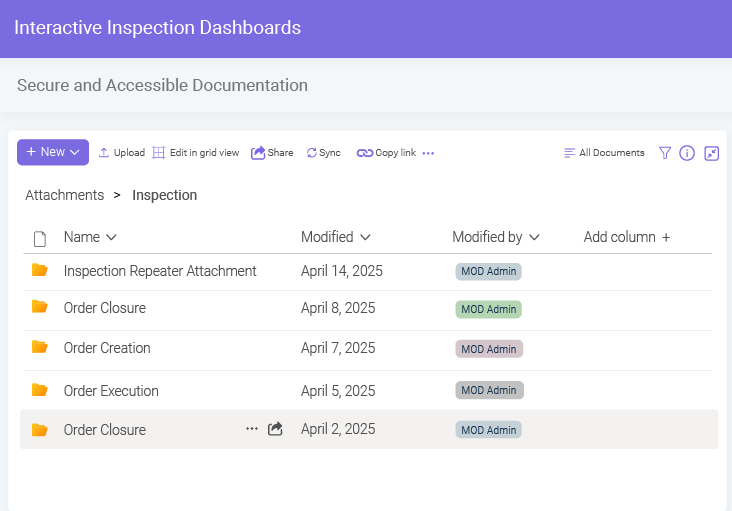
Leverage robust document management and control to ensure all your inspection records, templates, checklists, and supportive documentation are stored and managed in a centralized, secure, and controlled environment.
Secure and Accessible Documentation
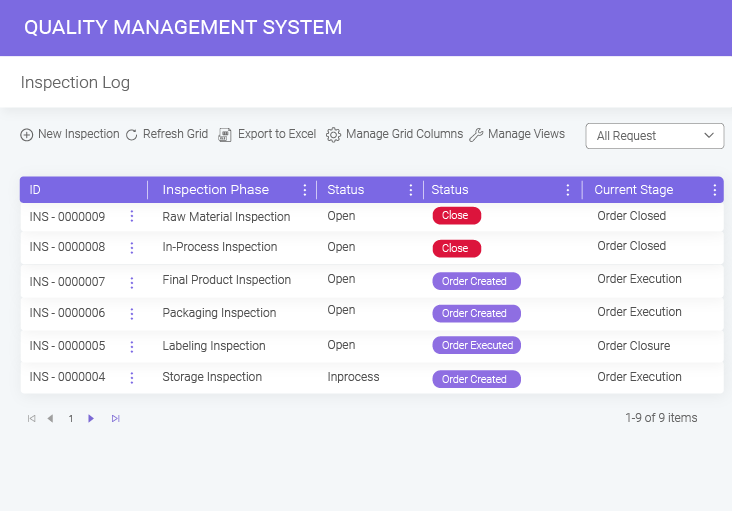
Easily record and monitor every action throughout the inspection process with a dedicated log that offers a holistic overview of inspection details, status, involved departments, and related records for streamlined inspection management.
Dedicated Inspection Log

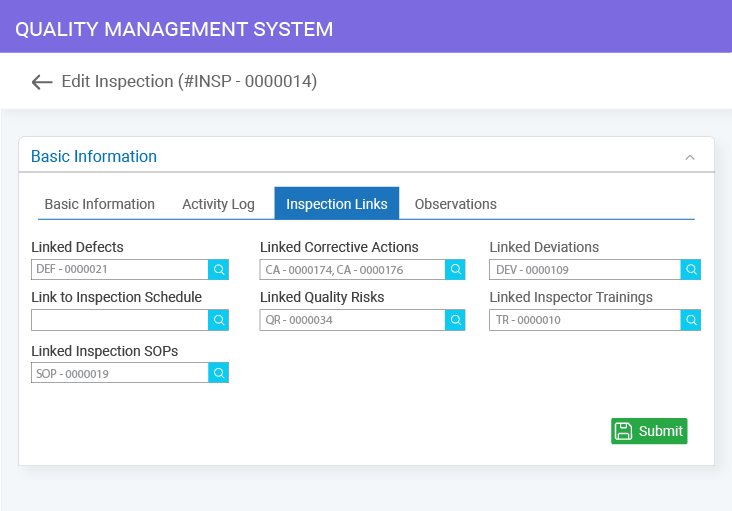
BizPortals inspection management system is an integrated part of the larger quality ecosystem with robust cross-module integration that improves inter-module data flow, enhances responsiveness, and ensures end-to-end visibility into the quality processes.

Integrated Inspection Module
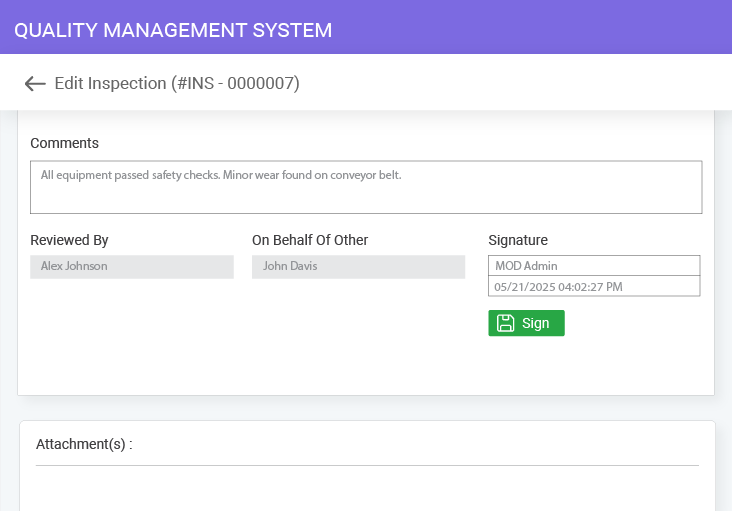
Accelerate your inspection process while ensuring compliance and audit readiness with effortless electronic signatures. Empower globally dispersed teams to securely authenticate records and approvals, enhancing both data integrity and response times.
Audit-Ready E-Sign Process
Choose a QMS that adapts to your unique quality processes. Get a configurable solution with tailored modules, workflows, templates, and user roles, and easily scale as new products, suppliers, or compliance rules are introduced.
Configurable Inspection Setup
From Features to Results
See how BizPortals QCFlow streamlines every step

Key Benefits of Using a Digital Software for Inspection Management

Ensures Consistent Quality Standards

Ensures Consistent Quality Standards

A configurable digital QMS helps standardize inspection criteria, workflows, and documentation across teams and locations, ensuring all stakeholders stay aligned with consistent, organization-wide quality standards and regulatory expectations.

Improves Compliance and Audit Readiness

Improves Compliance and Audit Readiness

A well-planned inspection supports audits effectively. A QMS centralizes compliance data, ensuring actions are digitized, time-stamped, traceable, and secure—minimizing manual errors and boosting overall audit readiness.

Streamlines Issue Detection and Resolution

Streamlines Issue Detection and Resolution

A robust inspection management software helps quality teams quickly identify, document, and escalate issues, encouraging collaboration and enabling employees to share suggestions, learn from past inspections, and drive proactive improvements across processes.

Drives Data-Backed Decisions

Drives Data-Backed Decisions

Digitizing inspection workflows centralizes data, tracks real metrics, and delivers actionable insights—reducing reliance on manual processes while enhancing decision-making, ensuring consistent quality, and boosting overall operational efficiency.

Promotes Accountability and Transparency

Promotes Accountability and Transparency

Leveraging a QMS promotes accountability by assigning clear task ownership, enabling role-based access, tracking actions in real-time, and sending automated alerts—building a transparent, responsible, and audit-ready inspection environment.

Documentation and Traceability

Right from detecting issues to executing corrective and preventive actions, each stage is documented and records stakeholders’ actions, providing a clear audit trail for inspections.

How a Dedicated System for Inspection Management Works: From Planning to Continuous Improvement

planning phase

Planning Phase

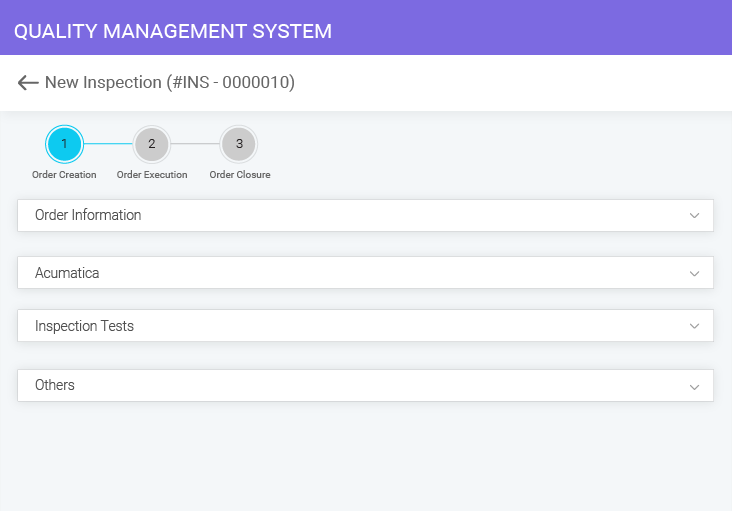
Inspection planning is the first and most critical step in inspection management. From defining criteria and frequency to creating checklists and assigning roles, a digital inspection management system simplifies it all with dedicated planning dashboards, version-controlled checklist templates, automated scheduling, and reminders—helping quality teams ensure consistency, save time, and stay aligned with compliance requirements.

Execution phase

Execution Phase

BizPortals QMS empowers quality teams to perform inspections with precision and control. While the secure digital platform enables remote inspections, it also offers a centralized place to store, access, and review inspection records, attach supportive evidence, add recommendations, and ensure traceability—thereby improving accuracy and accelerating issue resolution.

record and analyze

Record and Analyze

BizPortals QMS simplifies inspection analysis by allowing metadata filtering, KPI tracking, issue flagging, and access to historical records. It empowers teams to identify trends, prioritize risks, and collaborate effectively on corrective actions—transforming inspection data into actionable insights that drive continuous improvement, strengthen compliance, and elevate overall quality performance.

Improve and Retain

Improve and Retain

Structured inspections empower organizations to stay compliant and consistent by identifying trends, uncovering root causes, and driving smarter decisions. With robust retention policies, transparent feedback loops, and detailed inspection logs, teams can swiftly update SOPs, guidelines, and manuals—fostering cross-functional learning, operational excellence, and a culture of quality improvement.

How a Dedicated System for Inspection Management Works: From Planning to Continuous Improvement

1 Planning Phase
2 Execution Phase
3 Record and Analyze
4 Improve and Retain

Planning Phase

Inspection planning is the first and most critical step in inspection management. From defining criteria and frequency to creating checklists and assigning roles, a digital inspection management system simplifies it all with dedicated planning dashboards, version-controlled checklist templates, automated scheduling, and reminders—helping quality teams ensure consistency, save time, and stay aligned with compliance requirements.

Execution Phase

BizPortals QCFlow empowers quality teams to perform inspections with precision and control. While the secure digital platform enables remote inspections, it also offers a centralized place to store, access, and review inspection records, attach supportive evidence, add recommendations, and ensure traceability—thereby improving accuracy and accelerating issue resolution.

Record and Analyze

BizPortals QCFlow simplifies inspection analysis by allowing metadata filtering, KPI tracking, issue flagging, and access to historical records. It empowers teams to identify trends, prioritize risks, and collaborate effectively on corrective actions—transforming inspection data into actionable insights that drive continuous improvement, strengthen compliance, and elevate overall quality performance.

Improve and Retain

Structured inspections empower organizations to stay compliant and consistent by identifying trends, uncovering root causes, and driving smarter decisions. With robust retention policies, transparent feedback loops, and detailed inspection logs, teams can swiftly update SOPs, guidelines, and manuals—fostering cross-functional learning, operational excellence, and a culture of quality improvement.

See the Full QMS
See how BizPortals QCFlow unifies all quality processes

How Leading Industries Use BizPortals QCFlow’s Inspection Management System to Ensure Quality

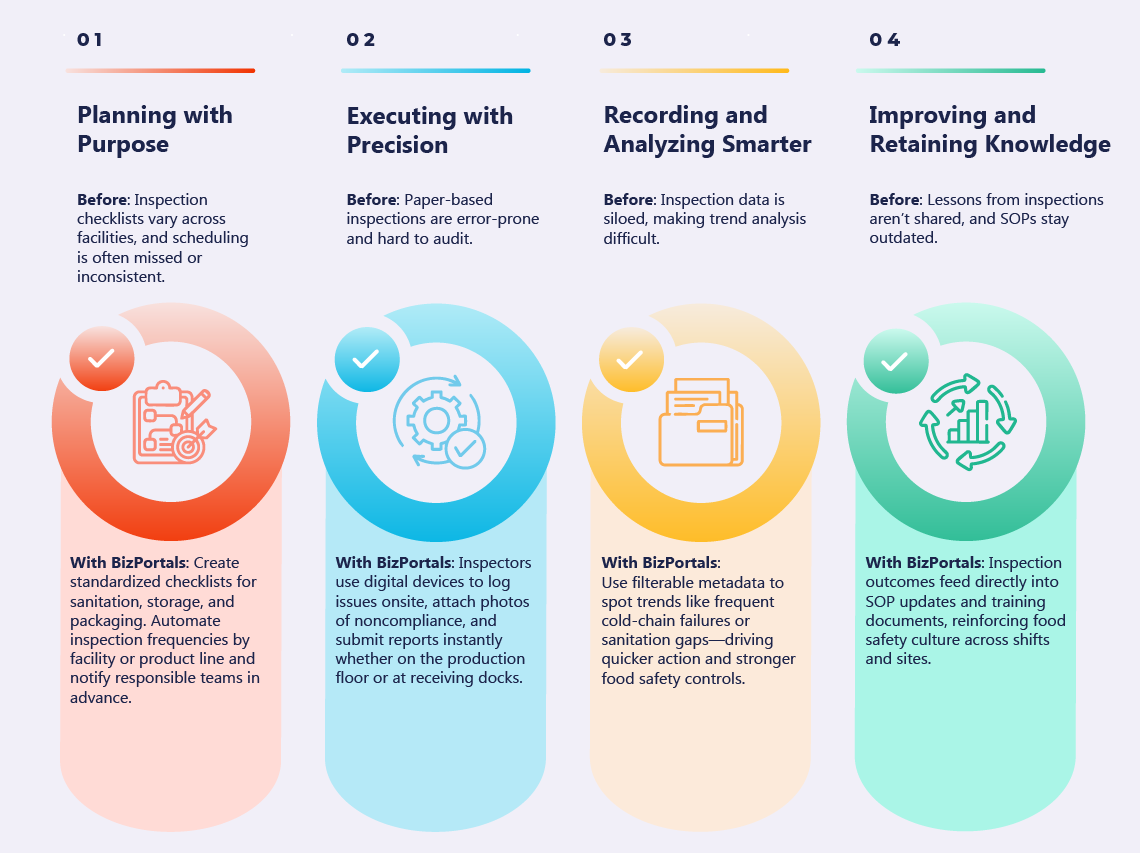
Inspections are the backbone of quality and compliance in many industries. To illustrate the inspection process more clearly, let’s take an example from the food & beverage sector — where maintaining hygiene and safety standards is vital. Here’s how BizPortals QCFlow digitizes and streamlines inspection workflows for better outcomes.

Visualize the Inspection Process – Example from the Food & Beverage Industry

With BizPortals QCFlow, a QMS software powered by Microsoft 365, empower your quality teams to keep inspections proactive, consistent, and compliance ready.
Inspection Management Software vs. Manual Process: Side-by-Side Comparison

See how BizPortals QCFlow enhances inspection management by eliminating paperwork, automating tracking, and ensuring stronger compliance across the organization.
Key Aspect Manual Inspection Process BizPortals QCFlow (Inspection Management Software)
Centralization
Scattered across files, folders, or physical cabinets
All inspection data, schedules, and records in one platform
Consistency
Inconsistent formats and testing methods
Standardized checklists ensure uniform inspections across sites and teams
Accountability
Difficult to trace who did what and when
Role-based access, digital signatures, and time stamps for full responsibility tracking
Scalability
Becomes unmanageable as inspections grow in volume or complexity
Handles inspections across multiple locations and large teams seamlessly
Data Integrity
Prone to duplication, loss, or misinterpretation
Accurate, real-time data entry with minimal risk of errors
Responsiveness
Delays in communication and slower corrective actions
Instant alerts and escalation for issues detected during inspections
Don’t Let Manual Inspections Hold You Back
Take control of inspections with BizPortals QCFlow

FAQs

What is an inspection management system, and how does it work?
An inspection management system is a digital tool that helps organizations plan, schedule, perform, and track inspections. Being a digital, centralized platform, it empowers quality teams with digital checklists, records, and reports, making inspections more accurate, efficient, and compliant across the organization.
Unlike spreadsheets or paper, an inspection management system centralizes all data, automates tracking, and ensures consistency throughout the process. It reduces errors, saves time, and provides real-time visibility, which manual processes cannot deliver.
Features such as easy scheduling, digital checklists, automation, reporting, compliance support, and integration with other quality processes are necessary to streamline your inspection management workflow. However, you can also consider scalability, customization options, and vendor support to ensure it fits your organization’s needs.
Yes. A digital software for inspection management allows you to create custom inspection checklists, workflows, and reports. It adapts to your processes, industry requirements, and organizational structure, so your inspections are aligned with how your teams actually work.
BizPortals QCFlow is designed to scale across multiple teams, locations, and even global operations. You can add users, create new workflows, add libraries, and manage inspections consistently across all sites while keeping data centralized and accessible.
BizPortals QCFlow, built on Microsoft 365, provides enterprise-grade security to keep your data safe. Additionally, features such as role management, permission-based access, e-signatures, and more ensure strict access controls and compliance with industry security standards.
Yes. The inspection module is fully integrated with CAPA, document control, audit, and other QMS processes, allowing inspection results to trigger corrective actions, link to relevant documents, and support continuous improvement without the need for managing separate systems.
Your team can get started quickly with guided onboarding, training, and ongoing support. Our team ensures seamless implementation, enabling users to adopt the system easily and begin managing quality without delay.

Free QMS buyer's guide

Choose the right QMS for compliance & efficiency

ewp iso
iso-2700

BizPortals QMS Pricing

BizPortals QMS Pricing

BizPortals QMS Pricing