Risk Management Software to Strengthen Your Quality Management

Manage risks more effectively with a robust risk management solution designed to enhance safety and compliance.
Risk Management Software to Strengthen Your Quality Management

What is Risk Management Software?

A quality risk management solution offers a structured process to identify, assess, and mitigate potential issues or risks that could affect the quality of a product or service.

By addressing risks proactively, organizations can avoid costly reworks, prevent product recalls, and eliminate potential quality issues that could harm customers, damage their reputations, or lead to legal consequences. Many regulatory compliances, mandate robust risk management practices to safeguard workplace safety, protect public health, and maintain the highest quality standards.

Why Choose a Digital Solution for Risk Management?

From risk identification to mitigation, streamline the entire risk management workflow to minimize delays and ensure timely actions. Easily automate and set predefined triggers for reviews, approvals, and notifications to reduce manual errors and improve consistency.
Automated Risk Management Workflow
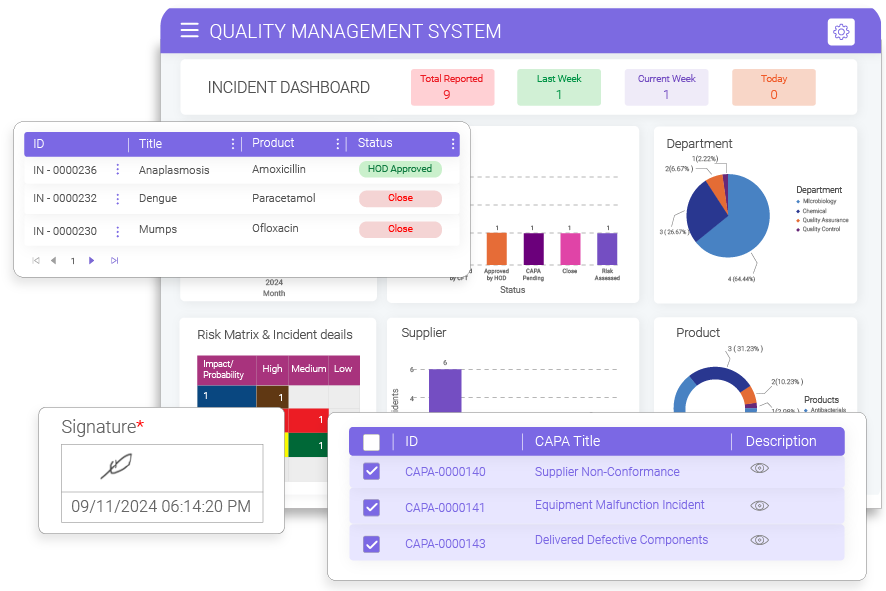
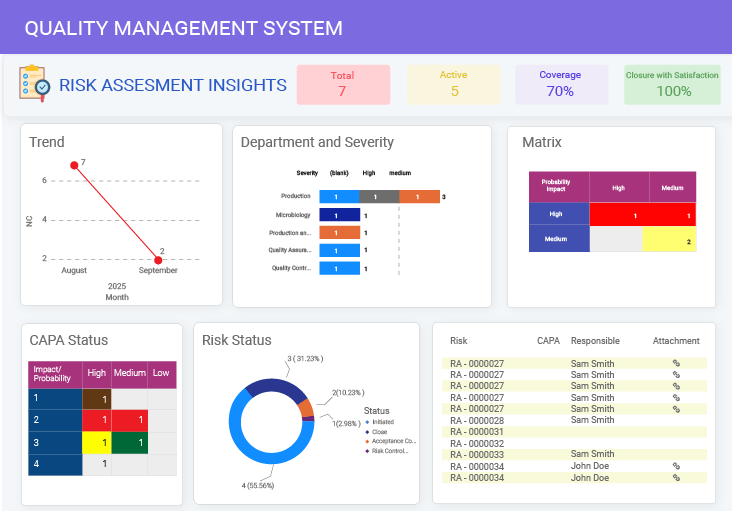
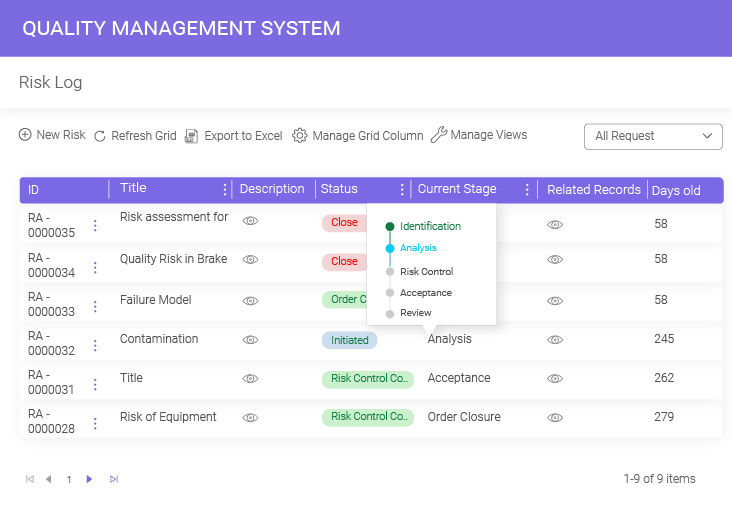
Get access to real-time risk insights for faster, data-driven decision-making. A dedicated risk management dashboard empowers users to pull data from different risk management activities and visualize them in interactive graphs and pie chart formats.
Real-Time Risk Insights
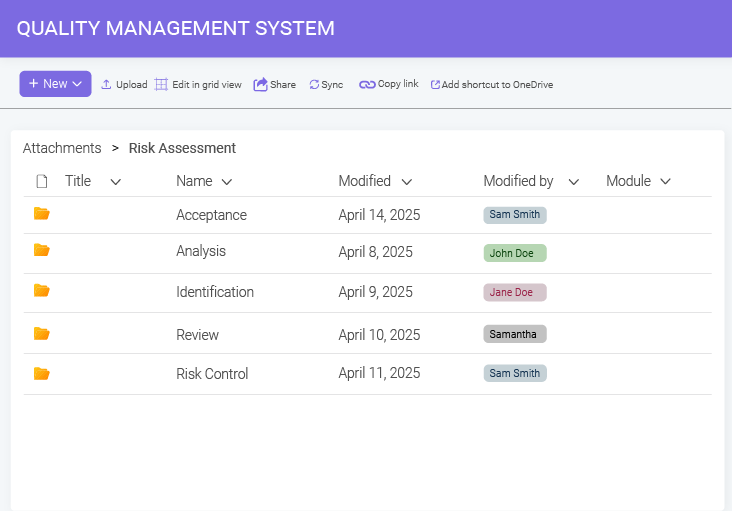
Make sure all your risk-related documentation is properly stored, organized, and secured. Use features like centralized document libraries, version control, audit trails, and role-based access to maintain an accurate and auditable record of risk management activities.
Document Control
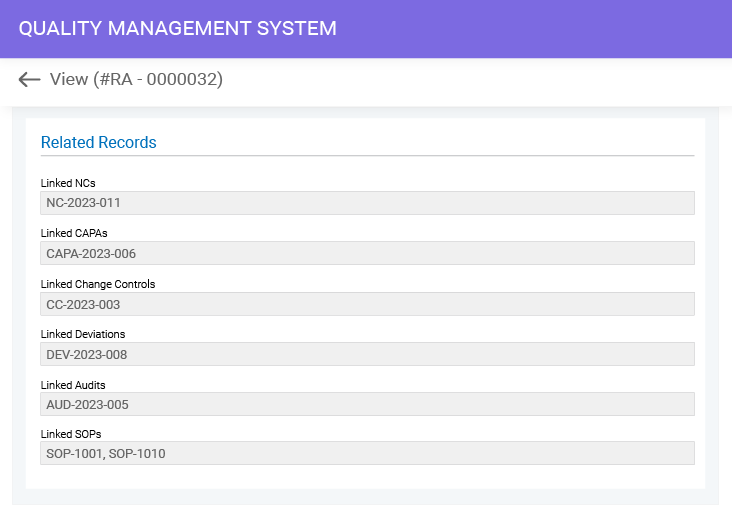
Leverage cross-module integration to drive a collaborative, data-driven approach to risk management and reporting. Proactively identify risks, enhance data flow, and gather multiple perspectives, ensuring a holistic view of risk management.
Collaborative Risk Response & Reporting
From risk identification to closure, access a comprehensive activity log that tracks all risk-related records, reports, suggestions, approvals, and actions, ensuring accountability, transparency, and traceability.
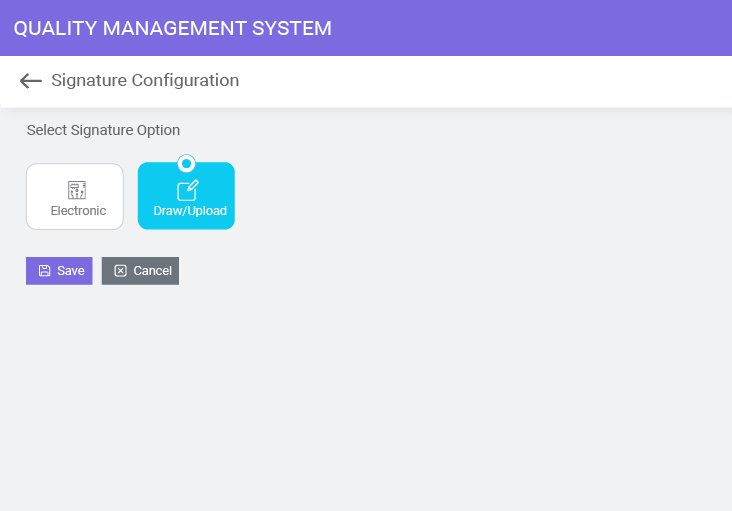
Digital signatures with clear time stamps ensure accountability and ownership. Stakeholders can easily draw or upload their signatures or use credentials to streamline risk-related approvals, even in remote work environments.
Secure Digital Signature

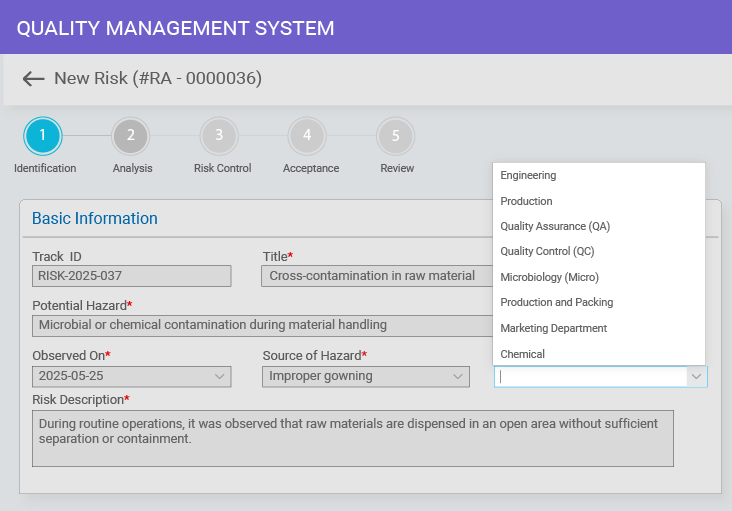
Align your risk management solution with your unique, industry-specific process. Customize risk management workflows, dashboards, and templates while adjusting access controls and alerts to improve response time and ensure compliance.

Full Configurability
See These Features in Action
Get a personalized demo tailored to your team

Key Benefits of Managing Risks with a Digital QMS

Ensure Compliance with Regulatory Standards

Ensure Compliance with Regulatory Standards

A digital QMS brings your compliance documents, workflows, audits, and training together and helps streamline your compliance efforts, reduce risks, and help showcase your commitment to maintaining high quality.

Improves Product and Service Quality

Improves Product and Service Quality

Identifying potential risks early in the process—whether in design, manufacturing, or service delivery helps organizations take proactive steps to prevent defects, inconsistencies, and substandard quality of products or services.

Prevents Product Failures and Recalls

Prevents Product Failures and Recalls

Efficient risk management by continuous monitoring, audits, and inspections helps organizations detect deviations in quality processes in the early stages, minimizing the likelihood of such risks associated with product failure and potential recalls.

Enhance Decision Making

Enhance Decision Making

Managing risks digitally empowers teams to access real-time risk data and insights, automate workflows, and foster secure information sharing and collaboration, enabling faster, more informed decisions for effective risk mitigation.

Improves Organizational Resilience

Improves Organizational Resilience

By leveraging a dedicated risk management system software, quality teams can establish a structured framework to identify and mitigate potential threats, enabling them to quickly adapt strategies and minimize the impact of unforeseen quality events.

Stronger Market Reputation

Stronger Market Reputation

A QMS streamlines quality processes, allowing organizations to swiftly address issues and prevent defective products from reaching the market. This proactive approach boosts credibility and reputation and fosters customer satisfaction and loyalty

Documentation and Traceability

Right from detecting issues to executing corrective and preventive actions, each stage is documented and records stakeholders’ actions, providing a clear audit trail for inspections.

Simplifying the Risk Management Process with BizPortals QMS

Risk Identification

Risk Identification

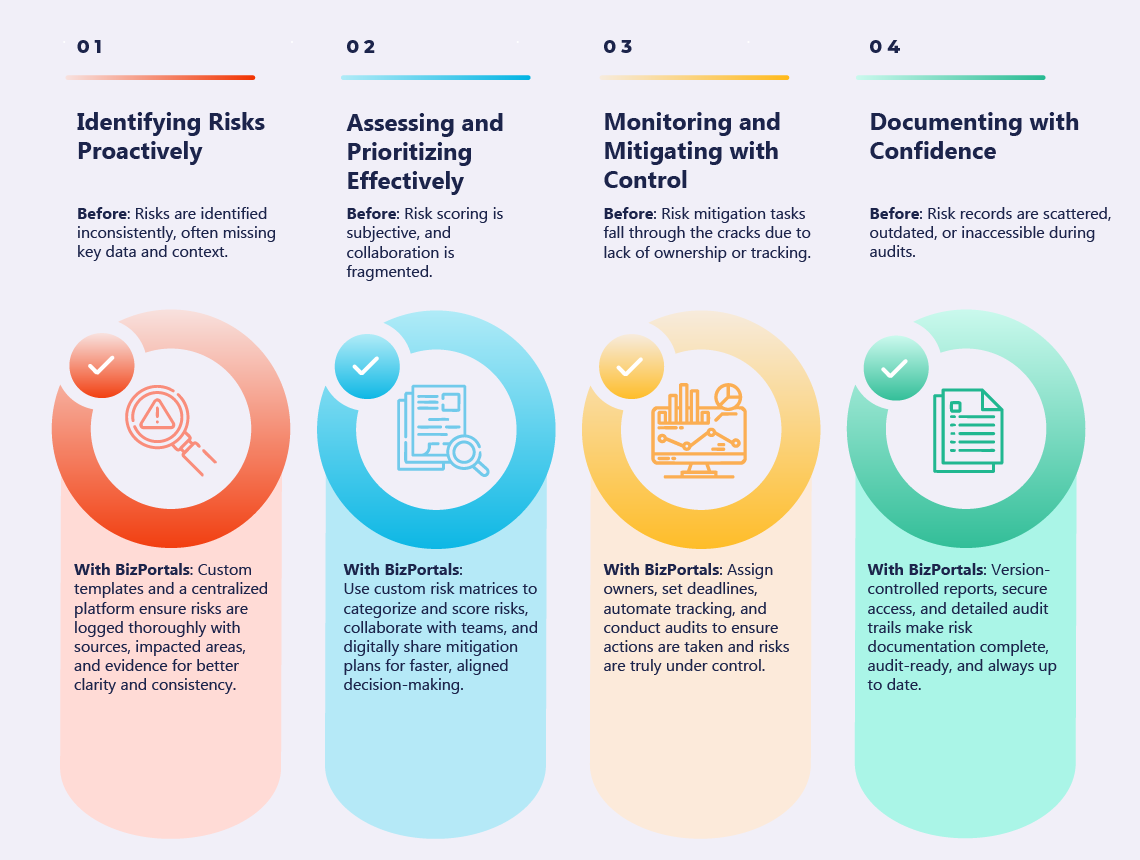
The first phase of risk management involves systematically identifying and documenting potential risks that could negatively impact quality. The risk management software provides a centralized platform for risk identification and data collection, along with custom risk registration templates to analyze sources, affected areas, and evidence for a more consistent and holistic approach to risk.

Risk Assessment

Risk Assessment

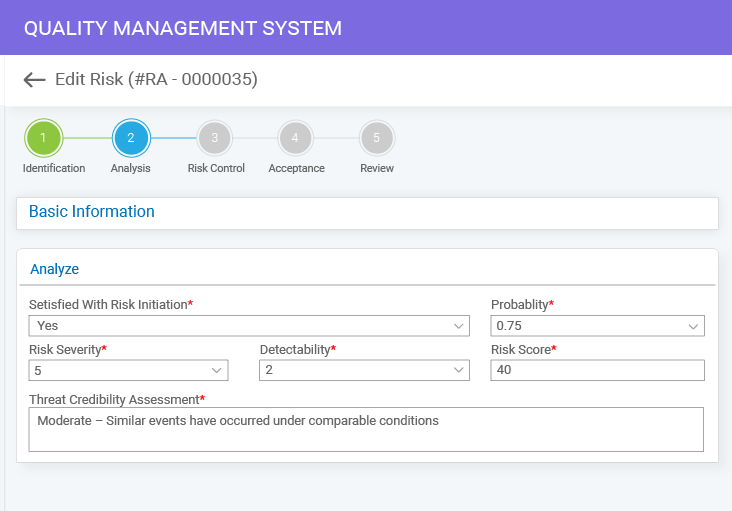
Assessing the risk is the next step, once it is documented. BizPortals QMS helps users efficiently log, categorize, and score risks based on custom risk matrices. Easily collaborate with cross-functional teams to assess risk-related data, create mitigation plans, securely share them with your peers, and get them approved digitally, all within a SharePoint platform.

Risk Monitoring and Review

Risk Monitoring and Review

Risk mitigation strategies, when applied correctly, prevent risks from occurring and significantly reduce their potential impact. BizPortals QMS empowers quality teams to create and implement corrective actions and helps them assign responsibilities, set deadlines, track tasks, and conduct regular audits to review effectiveness and foster continuous improvement.

Documentation and Reporting

Documentation and Reporting

Powerful document control features offered by BizPortals QMS ensure that all the risk-related events, including supporting evidence, reviews, decisions, and reports, are well-documented for compliance and auditing purposes. Customizable report template, version control, audit trail, and permission-based access assure that records remain secure, accurate, and up-to-date.


Simplifying the Risk Management Process with BizPortals QCFlow

1 Risk Identification
2 Risk Assessment
3 Risk Monitoring and Review
4 Documentation and Reporting

Risk Identification

The first phase of risk management involves systematically identifying and documenting potential risks that could negatively impact quality. The risk management software provides a centralized platform for risk identification and data collection, along with custom risk registration templates to analyze sources, affected areas, and evidence for a more consistent and holistic approach to risk.

Risk Assessment

Assessing the risk is the next step, once it is documented. BizPortals QCFlow helps users efficiently log, categorize, and score risks based on custom risk matrices. Easily collaborate with cross-functional teams to assess risk-related data, create mitigation plans, securely share them with your peers, and get them approved digitally, all within a centralized platform.

Risk Monitoring and Review

Risk mitigation strategies, when applied correctly, prevent risks from occurring and significantly reduce their potential impact. BizPortals QCFlow empowers quality teams to create and implement corrective actions and helps them assign responsibilities, set deadlines, track tasks, and conduct regular audits to review effectiveness and foster continuous improvement.

Documentation and Reporting

Powerful document control features offered by BizPortals QCFlow ensure that all the risk-related events, including supporting evidence, reviews, decisions, and reports, are well-documented for compliance and auditing purposes. Customizable report template, version control, audit trail, and permission-based access assure that records remain secure, accurate, and up-to-date.

Comprehensive Quality Management Starts Here
See how risk integrates with all QMS processes

How a Digital Risk Management Solution Works Across Industries

Effective risk management is essential across high-stakes industries. To understand how the process plays out in practice, let’s look at the aerospace sector — where managing design, supplier, and operational risks is mission-critical. This example walks through how BizPortals QCFlow helps identify, assess, and control risks systematically.
How Aerospace Organizations Manage Risks with BizPortals QCFlow
A QMS software powered by Microsoft 365 turns reactive risk handling into a proactive, integrated process, ensuring aerospace organizations stay compliant, safe, and in control.

Digital Risk Management Software vs. Manual Process: Side-by-Side Comparison

Get a quick snapshot of how BizPortals QCFlow’s risk management solution outperforms traditional risk management methods by enabling proactive risk identification, stronger compliance, and complete process visibility.
Key Aspect Manual Process BizPortals QCFlow (Risk Management Software)
Data Collection
Scattered across spreadsheets, documents, and emails
Centralized and structured in a single system
Risk Documentation
Varies by person/team, prone to inconsistency
Standardized templates and consistent formats
Information Access
Time-consuming to locate, limited transparency
Easily searchable with controlled permissions
Tracking & Updates
Requires manual entries and follow-ups
Automatically recorded and updated in real time
Collaboration
Dependent on sharing files or meetings
Multiple teams can work simultaneously in one platform
Don’t Leave Risks Unmanaged
Begin today with a quick demo session

FAQs

What is risk management software, and how does it work within BizPortals QCFlow?
A digital solution for risk management enables organizations to identify, assess, and track potential risks before they escalate into critical issues. Within BizPortals QCFlow, it serves as an integrated module that centralizes risk data, streamlines documentation, and integrates with other quality processes for complete visibility.
The risk management solution is not a standalone product. It is part of the complete BizPortals QCFlow. The risk management module integrates closely with CAPA, document control, and other QMS modules. It ensures that risks are linked to corrective actions, quality records, and workflows, providing a connected quality ecosystem rather than isolated processes.
Industries such as manufacturing, healthcare, pharmaceuticals, aerospace, construction, and energy benefit the most. Any industry with strict compliance requirements or complex processes can leverage a digital risk management solution to enhance safety, minimize errors, and comply with regulatory standards.
Yes. The module can be customized with risk templates, workflows, and permissions to match your organization’s existing processes. This flexibility ensures the system supports your unique requirements without forcing you to change how you manage risks.
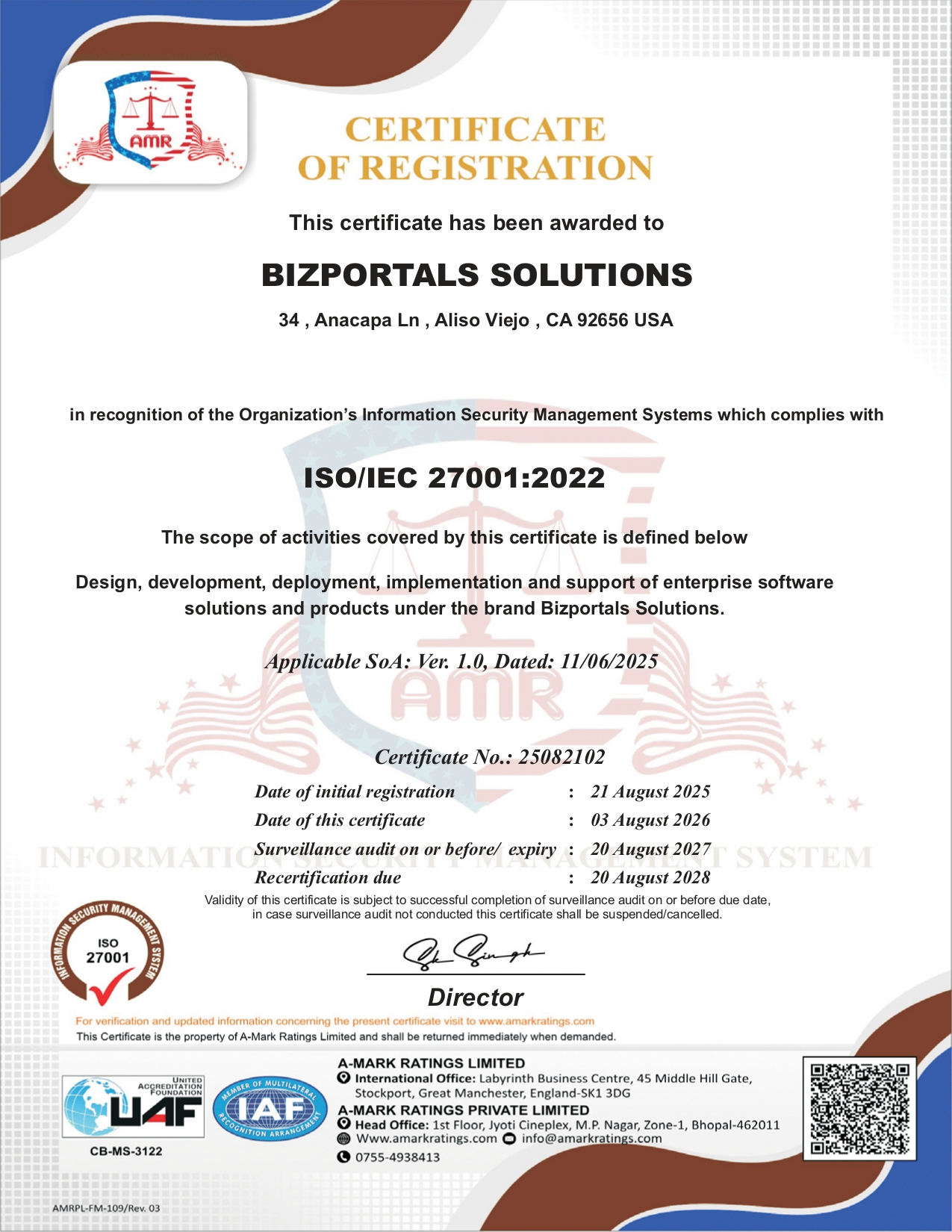
BizPortals QCFlow utilizes Microsoft 365 security features, including regular security patches, access controls, and role-based permissions, to ensure that risk data remains secure, compliant, and accessible only to authorized team members.
Yes. The risk management module is fully configurable. You can tailor workflows, templates, and reports to match your processes, making it easy to adapt the system without complex changes.
The risk management module scales with your organization by supporting unlimited users, customizable workflows, and enterprise-level data management. Whether you expand teams, processes, or compliance requirements, BizPortals QCFlow adapts to keep risk management consistent and effective.

Free QMS buyer's guide

Choose the right QMS for compliance & efficiency
ewp iso
iso-2700

BizPortals QMS Pricing

BizPortals QMS Pricing

BizPortals QMS Pricing