A Digital eQMS Software Built for Agility and Compliance
This article explains what an electronic Quality Management System (eQMS) is, how it improves compliance and efficiency, and why businesses should shift from traditional paper-based QMS to a digital solution. It highlights key features, implementation steps, benefits, and decision criteria, helping organizations understand when and why adopting an eQMS becomes essential for sustainable quality management.
What is an eQMS Electronic Quality Management System?
An electronic quality management system (eQMS) is a digital platform that provides a secure framework to streamline, centralize, document, and track all the quality management processes within the organization.
An eQMS helps organizations digitize their day-to-day quality management workflow, such as identifying quality events, planning corrective measures, conducting audits, and documenting the entire process.
Now comes a valid question: How is an eQMS different from the traditional QMS?
Traditional QMS focuses more on achieving compliance through manual processes and physical record-keeping. Its reliance on paper-based workflows often creates the illusion of effective quality management, while hiding probable systemic issues that can ultimately damage brand reputation.
In contrast, an electronic quality management system, by digitizing and automating processes, acts like a living network that connects people, processes, and systems in a centralized environment.
Is an eQMS a Necessity?
The answer is a big YES.
The way we manage quality is evolving faster than most teams are ready for.
Even though the global QMS market surpassed USD 11 billion in 2024, only 28% of industrial firms use a digital system. Nearly half of SMBs still manage quality on paper, keeping compliance scattered and progress slow.
Enterprises that have adopted digital QMS solutions report up to 68% gains in compliance and efficiency, yet many others hesitate, citing cost and complexity.
The irony is clear: it’s not about benefits or implementation cost—it’s about readiness.
Avoid mistakes and choose the right solution confidently.
How Does eQMS Software Work?
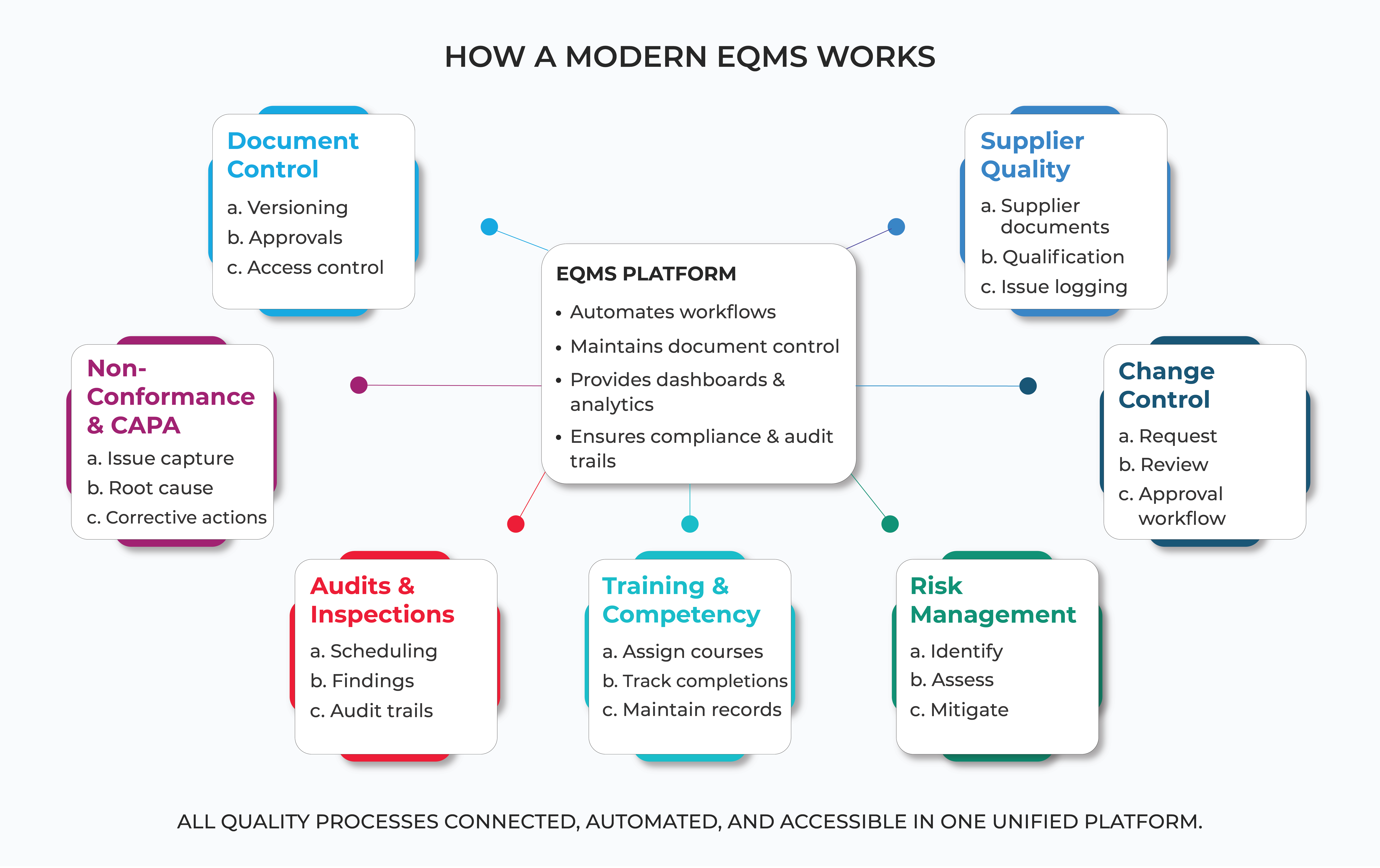
An eQMS software streamlines quality management through automation and links quality-related activities across your organization.
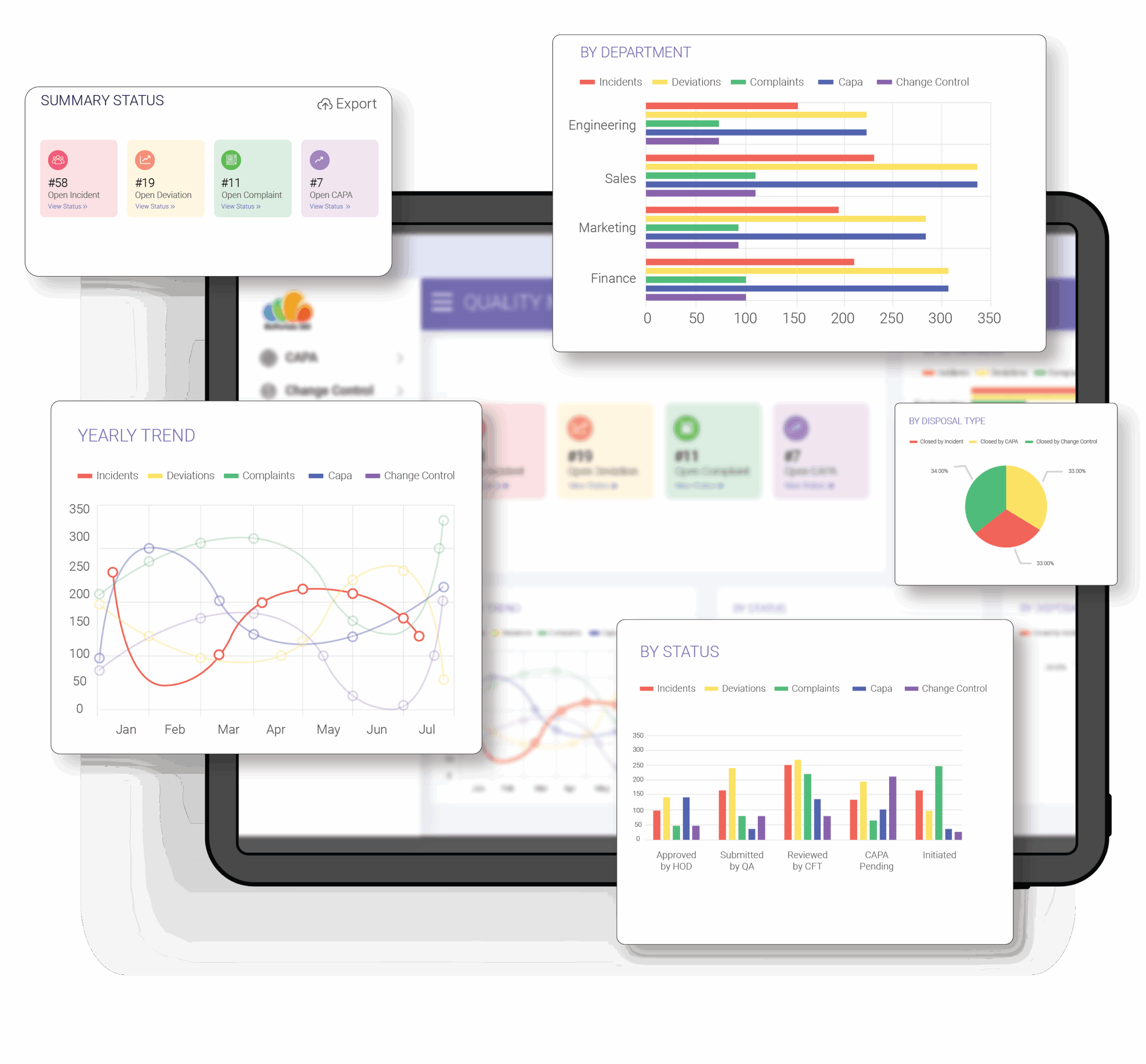
It offers powerful features such as document versioning, activity log, interactive dashboards, cross-module integration, role management, and more, enhancing visibility, compliance, and decision-making.
Which critical quality management activities are elevated by implementing a digital QMS? Let’s understand them in detail:

Document control and controlled content
An eQMS enables quality teams to enforce access controls, define user roles, track changes, and maintain the latest version of the documents. While it maintains a time-stamped history of reviews and approvals, it also automates email notifications to end the manual follow-up loop.
Non-conformance and CAPA
It empowers teams to capture quality issues wherever they occur, triggering an optimized workflow to investigate root causes and assign corrective tasks. The system provides clear visibility of the status of each CAPA, preventing issues from being overlooked and enabling proactive quality improvements.
Audit and inspection management
Audits need clear, documented processes aligned with set procedures and regulatory compliance. An eQMS software allows you to digitally assign tasks, track and record findings, centralize related documents, schedule events, and access audit trails, making the process more organized and transparent.

Training and competency management
With a digital QMS solution, you can easily centralize training resources, SOPs, and learning resources in one place, making it easier for teams to access the latest versions whenever needed. Managers can create, assign, and monitor training, receive alerts, upload assessments, and maintain each employee's training history to identify and fill skills gaps within the organization.

Supplier and procurement quality management
An eQMS creates a secure, centralized hub for easily storing and accessing all your supplier-related documents, qualifications, certifications, contracts, compliance checklists, and performance records. You can check the latest agreements, run quality checks, log supplier-related problems, and assign follow-up tasks in real time.

Change control and management
In a Microsoft 365 environment, it is much easier to request, review, approve, and track changes to products, processes, or documents. Create custom forms to capture change requests, route them to the right reviewers, stay up to date on the latest changes, collaborate on revisions, and maintain full traceability throughout the process.
Risk management and analytics
With an eQMS, you can easily identify risks, evaluate their impact, and track mitigation activities without relying on scattered files or manual updates. Standardize your complex risk management workflows with custom forms and automated approvals, reviews, and follow-ups, and use real-time risk dashboards for accurate trend analysis, clear insights, and smarter decision-making.

Seamless system integration
Cross-module integration is the biggest advantage of having an eQMS based on Microsoft 365. It seamlessly connects different quality processes like documentation, CAPA, training, audits, and more to eliminate silos and enable smooth data flow. You can connect to other business systems and third-party applications, such as ERP, CRM, and HR platforms.
Avoid mistakes and choose the right solution confidently.
How to Plan and Structure Your eQMS on Microsoft 365?
Implementing a digital QMS requires careful planning and cross-functional collaboration. You need to define clear objectives, outline workflows, train employees, and plan strategies for continuous improvement.
While Microsoft 365’s familiar interface and features help reduce the employees’ learning curve, you should still follow a structured implementation process to ensure your eQMS becomes a true driver of quality and compliance.

Define objectives and success metrics
Start by setting clear objectives for your eQMS project. You can shortlist common goals like faster document approvals, better audit readiness, and fewer quality incidents and identify measurable metrics to track them.

Assemble a cross-functional implementation team
Create a cross-functional team of key stakeholders from different departments. As quality processes touch the entire company, creating such a team can help you capture every angle. Assign clear roles to each stakeholder and allow them to offer practical insights and expertise to shape the overall requirements for the eQMS project.
Map your quality processes
Create a blueprint of the actual quality processes in detail to reveal gaps and duplication.
For example, map out your document control process (who drafts an SOP, who reviews it, and what happens in case of a revision or a change). Once done, it will ensure that everyone in your organization shares a common understanding of that process.
Prepare your data and documentation
Start by gathering all your existing quality documents in one place. Before migrating to anything, perform a thorough cleanup.
Remove outdated versions, fix inconsistent templates, and ensure that only accurate, approved content moves forward. This step ensures that past problems do not carry over into your new system.

Plan the implementation with your vendor
Work closely with a Microsoft 365 consultant or eQMS vendor. Discuss the complete implementation plan and include typical milestones such as system design completion, workflow sample readiness, pilot testing, corrections, user training, final migration, and post-implementation support. Assign roles to review items and prepare risk assessments to reduce unnecessary delays and rework.

Train, communicate, and drive adoption
Use multiple training methods, including live demos, webinars, quick reference guides, and short videos, to offer more practical guidance.
Tracking and updating user training regularly and encouraging feedback can help you build a robust eQMS that your organization truly needs.
What Are the Benefits of Using Microsoft 365-Based eQMS Software?
An eQMS centralizes quality records, eliminates manual workflows, automates routine tasks, and ensures proper document control while fitting perfectly into your existing environment.
It can be your single-window solution to identify, track, and resolve incidents and collaborate with the right person to ensure quality and compliance.

Document management is native to Microsoft 365
Microsoft 365 stores files in libraries with built-in version history and check-in/check-out controls, so every revision is tracked and recoverable, ensuring document accessibility and audit readiness.

Built-in security, permissions, & compliance features
You can control user access at the site, library, and file level using permission groups and Active Directory integration. It limits edits to authorized users only, eliminating any discrepancies or errors.

Workflow automation
Power Automate and SharePoint workflows automatically route reviews, approvals, and notifications, reducing manual follow-up, backlog, and unnecessary delays. This enhances visibility into tasks and makes it easy to meet deadlines.

Familiar user interface for faster adoption

Teams already using Microsoft 365 find it easy to work with its familiar layout and interface, which shortens training time and lowers resistance to change. A consistent UI means fewer errors and quicker adoption of the eQMS in day-to-day operations.

Scalability
An eQMS might include a few standard modules for a small team with limited requirements, or it can have dedicated custom modules to cater to the needs of different departments with any number of employees. Storage, permissions, and structure can expand as your needs evolve.

Full configurability
You can configure libraries, metadata fields, forms, permissions, and approval flows to reflect your company’s procedures and practices. You can easily configure your eQMS to match the regulatory requirements and internal changes when needed.

Seamless integration
An eQMS built on Microsoft 365 integrates effortlessly with third-party business systems such as ERP, CRM, and more, reducing data silos and ensuring real-time visibility across your quality processes.
How to Evaluate and Choose the Right eQMS Software?
Choosing the right eQMS means selecting a system that is secure and centralized, aligns with your compliance needs, and fits smoothly into your existing quality management workflow.
The goal here is to find a platform that ensures cross-functional collaboration and scales with your operations without adding unnecessary complexity.
Here is a checklist to consider when evaluating an eQMS:
- Verify that the system empowers your workflows to fulfill the required standards.
- Check whether its core modules match your current and planned quality processes.
- Ensure it integrates well with the tools you already use, such as Microsoft 365, ERP, or other third-party applications.
- Confirm whether the deployment model aligns with your IT and data governance policies. (Microsoft 365 offers enterprise-grade security and is a strong fit for organizations with a global workforce, limited internal IT resources, and no strict requirement to maintain full control of their infrastructure)
- Evaluate the ease of use for stakeholders, approvers, and operational teams to reduce onboarding effort.
- Review performance indicators such as response time, search efficiency, and handling of large document sets.
- Look at configuration options to see if you can tailor workflows and metadata.
- Evaluate reporting and dashboard capabilities for oversight, audits, and stakeholder reviews.
- Verify that user permissions and security controls match your access requirements.
- Consider the total cost of ownership, including licenses, implementation, support, and future scaling needs.
Choosing an eQMS is about aligning the right capabilities with your operational requirements and long-term quality goals. If you want a structured framework to guide your selection process, our Buyer’s Guide breaks down everything you need to evaluate confidently.
When Is the Right Time to Move to an eQMS?
Move to an eQMS when your legacy systems or traditional paper-based processes begin to hinder your day-to-day operations.
In practical terms, the visibility, automation, and audit-readiness you experience after implementing an eQMS are often the strongest reasons to adopt one. It not only enhances your operational efficiency but also gives your organization a competitive edge.
However, here are a few common triggers that can be a wake-up call for many:

Growth and expansion pressure
Business triggers are organizational changes that make manual quality controls inefficient or inconsistent. They are typically driven by scale, structure, or external demands.
- Rapid growth or new markets (more users, products, or sites)
- Complex supplier or partner networks requiring coordinated controls
- Higher documentation demands for regulators or partners

Technology limitations and gaps
Technology limitations often reduce visibility, slow processes, or prevent integration, indicating that your current tools cannot scale with evolving business needs.
- Quality data scattered across network drives, email, and spreadsheets
- Remote teams are unable to collaborate
- Lack of audit trails, versioning, or mobile access

Compliance and quality risks
Readiness triggers are compliance or quality failures that show existing controls are inadequate and expose the business. An eQMS provides traceability and enforceable workflows.
- Recurring audit findings or inspection observations
- Rising CAPA volume, recalls, or serious nonconformances
- Data integrity gaps or missing documentation for key records
A self-assessment worksheet for leadership and quality teams.
What Is the ROI of an eQMS and How Do You Calculate It?
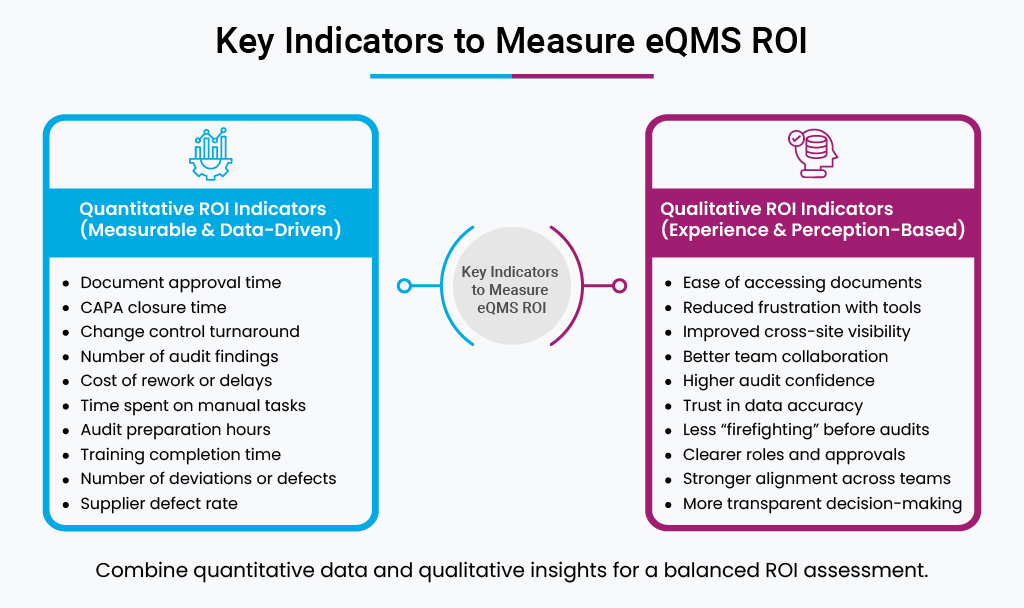
The simplest way to measure eQMS ROI is by establishing a clear baseline to track real changes before and after implementing the solution.
Start by setting a few metrics, such as CAPA closure rate, documentation error rate, audit readiness level, number of quality incidents, training completion rate, and more. Once the digital quality management system is implemented, monitor the same metrics to see their actual impact on the processes.
While measuring ROI, it’s important to include qualitative baselines as well. You can do this by running surveys and gathering feedback from the people who work with the system every day.
Their input helps you understand issues such as frustration with existing tools, limited visibility across sites, weak collaboration between teams, or gaps that slow decision-making.
This gives you a clearer picture of the real operational impact before and after the eQMS.
Why Choose BizPortals QCFlow for Your Digital Quality Transformation?
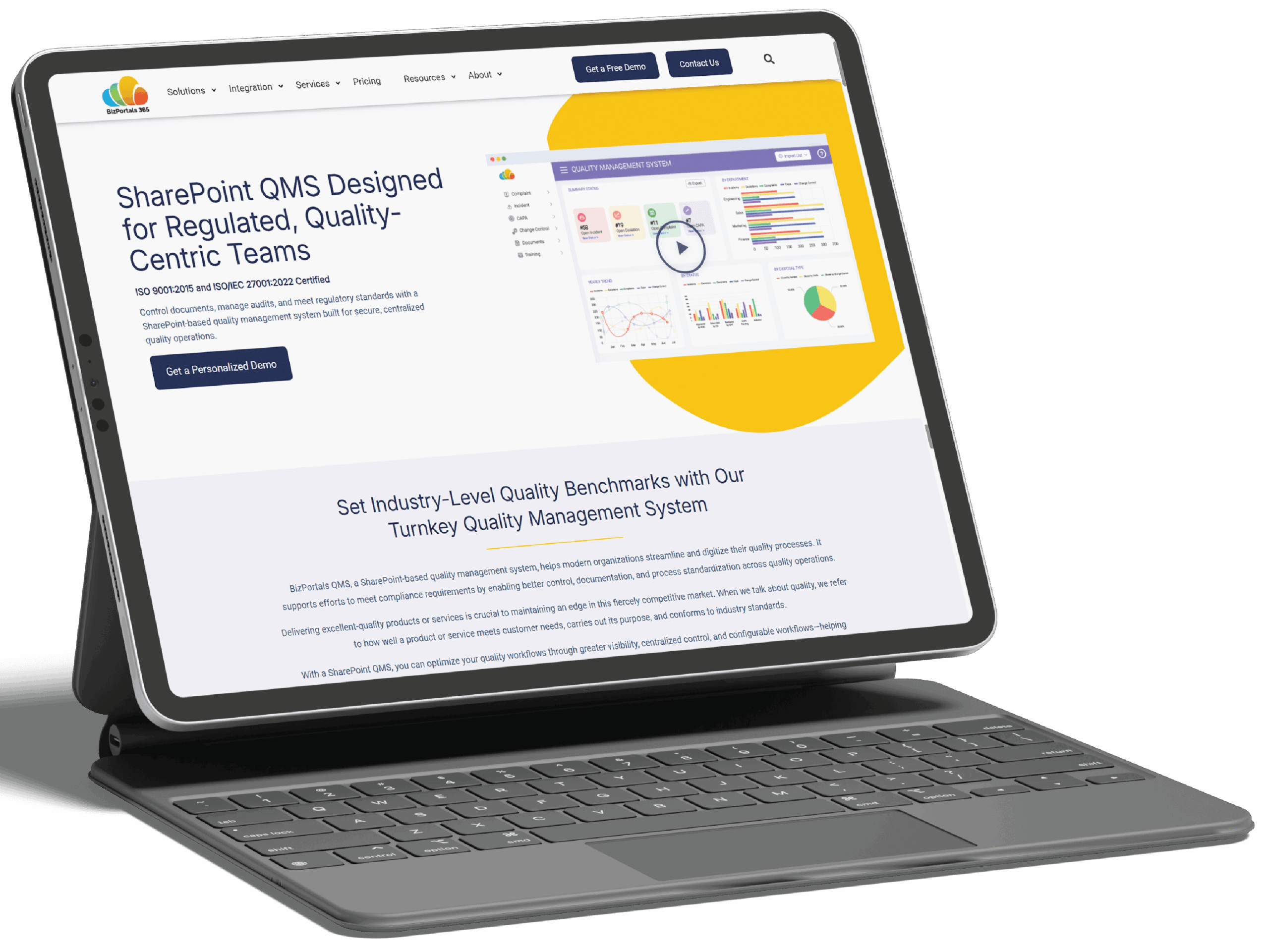
Quality and compliance can no longer rely on disconnected files, manual workflows, or outdated legacy systems. An eQMS built on Microsoft 365 can help establish new benchmarks for your quality management process.
From dedicated modules to managing different quality processes to cross-module integration, automated workflows, role management, and more, it enables seamless data flow within the organization while also restricting unauthorized access.
With effective document control, e-signature, audit trails, detailed activity logs, interactive dashboards, automated alerts, and more, BizPortals QCFlow empowers your teams to ensure consistency, enhance productivity, and strengthen your commitment towards quality.
Understand how it fits your quality framework.
What is the difference between an eQMS and a QMS?
A QMS is the overall framework of processes, procedures, and responsibilities that guides your quality management. Often, a QMS signifies the paper-based or traditional methods used to manage quality. Whereas an eQMS is the digital version of that system, using software to automate workflows, manage documents, and maintain compliance more efficiently.