A Secure SharePoint Document Management System Built for Modern Organizations

Manage the entire document lifecycle seamlessly with BizPortals 365 DMS, a powerful document management system built on SharePoint.

A Secure SharePoint Document Management System Built for Modern Organizations

What is a SharePoint-Based Document Management System?

A SharePoint DMS is a digital, centralized platform that enables organizations of all sizes to seamlessly create, store, organize, retrieve, and share documents in one place. In addition to shaping the entire document lifecycle, a robust DMS extends its role by offering a structured framework for document control, including versioning, co-authoring, audit trails, automated approvals, and distribution.

Many organizations relying on paper-based and legacy systems deal with scattered files, lost versions, and slow document approval processes. These issues often waste time, increase inconsistencies, and put important documents at risk. With BizPortals DMS, address these challenges by centralizing documents, enabling faster, more secure collaboration across teams and locations.

Centralized Storage

Secure, centralized space to store, organize, and access documents

User-Friendly

User-Friendly

Intuitive interface that boosts productivity and user adoption

Team Collaboration

Seamless collaboration with document sharing, tracking, and workflows

Integration

Integration

Connect effortlessly with eSignature, Outlook, OneDrive, and more

Powerful Features of BizPortals 365—A SharePoint-based DMS

Automated Workflows

Customized Dashboard

Detailed view of documents based on their location, departments, projects, or any other specific filter

Permission-Based Access

Permission-Based Access

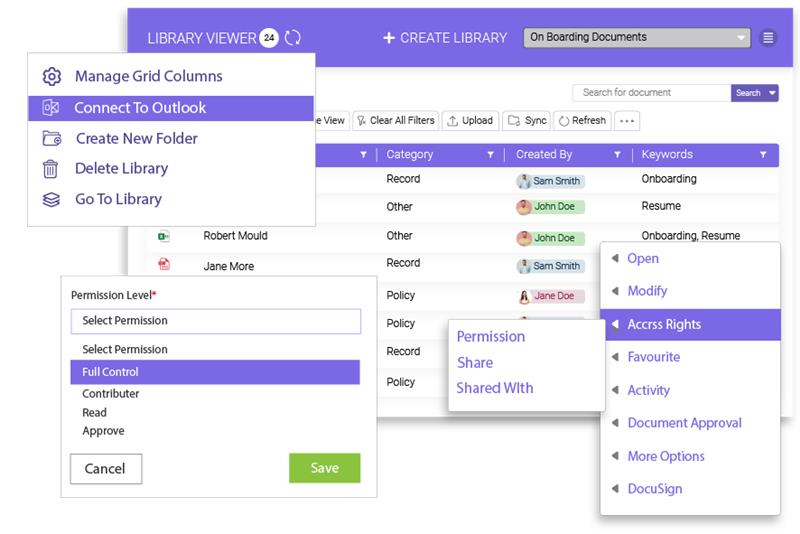
Enable permission-based access to control who can access your documents and to what extent

easy-check-incheck-out

Easy Check-in/Check-out

Ensure a smooth document collaboration experience by simply enabling check-in and check-out features

versioning

Versioning

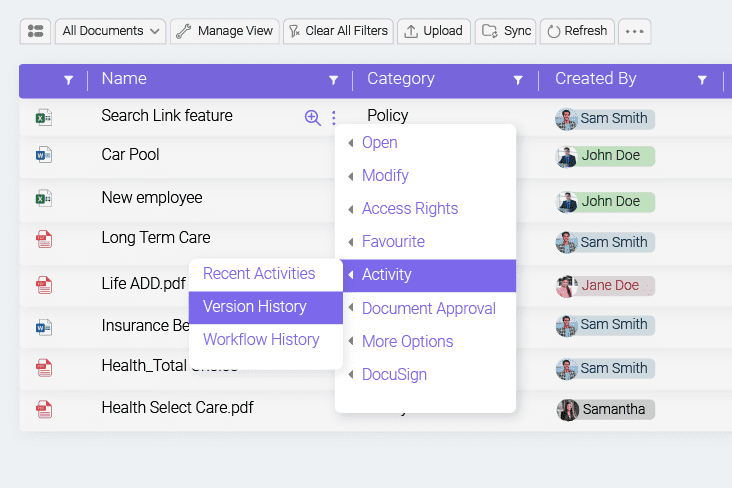
Monitor and control changes made to the documents and quickly restore the previous versions for corrections

auto-naming

Auto Naming

Set predefined document naming standards to establish organization-wide consistency and searchability of documents

merge-or-convert-docs-with-Ease

Merge or Convert Docs with Ease

Convert files into PDFs and merge two or more PDFs for preserved formatting and easy information sharing

Auto Reminders

Auto Reminders

Automate document approval and notify stakeholders of pending approvals, deadlines, and other related tasks

pin-or-mark-favorite

Pin or Mark Favorite

Allow your employees to pin key documents at the top or easily mark them as favorites for faster document access

Zip Doc

Zip Doc

Effectively zip multiple documents into a single archive for faster file transfer and a more organized repository

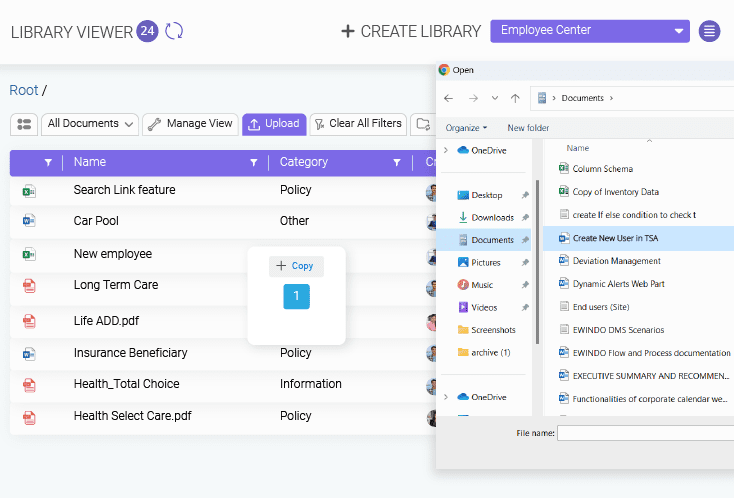
Bulk Upload and Easy Drag-and-drop

Bulk Upload and Easy Drag-and-drop

Drag and drop or upload multiple files at once, with just a click, using the bulk upload feature offered by the SharePoint DMS

See How These Features Save Time Every Day
Get a live demo built around real business workflows

Why Modern Organizations Need a Document Management System Based on SharePoint ?

Organized Document Repositories

Organized Document Repositories

SharePoint-based document management system offers centralized document repositories to easily create, organize, co-author, and share documents within the organization. With features like versioning, metadata integration, a robust search mechanism, and more, it is a fundamental tool for organizing intellectual property.

Improved Document Search and Retrieval

Leveraging a robust document search mechanism equipped with search filters, content types, quick links, and more helps save the cost of lost or inaccessible documents. Apart from keyword integration and document tagging, users can simply pin key documents on top or opt to follow or unfollow them easily for faster access.

Efficient Workflows and Approval

Streamline your document review and reduce manual intervention and approval time with automated document approval workflows. SharePoint document management offers status, approval, and notification workflows to ensure every document undergoes a standardized review and approval process.

Granular Document Security

Apart from the multi-factor authentication and role-based platform access offered by BizPortals 365 DMS, it ensures secure document handling at granular levels. Co-author documents, track versions and restore them, perform audits, and enable multi-level permission access for better and secure document control.

Granular Document Security
Make the Shift to Smarter Document Management
See how SharePoint-based QMS aligns with your goals

SharePoint DMS vs. Paper-Based Processes: A Side-by-Side Comparison

Key Aspects Traditional Paper-Based Processes BizPortals 365 DMS (SharePoint DMS)
Customization & Flexibility
Rigid and hard to adjust; changes require manual retraining and new paperwork.
Easily adapts to business-specific processes and team structures.
Scalability
Becomes unmanageable as document volume grows; space and tracking issues.
Handles large volumes of documents and users without disruption.
Cost Efficiency
High ongoing costs for printing, storage, filing, and physical infrastructure.
Subscription model with no need for large upfront investments or multiple licenses.
Support & Maintenance
No real-time support; issues require manual handling, often causing delays and miscommunication.
Comes with regular updates and support to keep things running smoothly.
Accessibility
Files can only be accessed from physical locations and are prone to delays and loss.
Access documents from anywhere, on any device with proper permission.
Security & Compliance
Physical files are easier to lose, damage, or access without authorization.
Built-in access control, data encryption, and audit tracking for compliance.
Collaboration & Workflow
Collaboration is slow and inefficient and often leads to version conflicts.
Enables real-time sharing, version control, and approvals within a digital workspace.
Modern Document Management Starts Here
Move to a secure, scalable system today—we’ll guide you

FAQs

What is BizPortals 365 DMS, and how can it help my organization?
BizPortals 365 DMS is a document management solution built on SharePoint. It helps you organize, store, and manage files in one place, making it easier for your team to find documents, stay organized, and work more efficiently.
Yes. It is designed to work for a wide range of industries and business sizes. Whether you are in healthcare, finance, education, or any other field, it can be easily configured to fit your specific document management needs and standard workflows.
Leveraging a SharePoint-based document management system, you get centralized document libraries, version history, approval workflows, permission control, and effortless global document search. It also helps track file activity and supports collaboration, so your team can manage documents more confidently and get work done faster.
Your data is protected with Microsoft’s built-in security, which includes access controls, data encryption, and audit tracking. Only authorized users can access documents, so you can manage files with confidence and keep sensitive information safe.
Yes, the system can be configured to match your industry-specific requirements and workflows. You can set up dedicated sites, folders, permissions, and approval processes that suit the way your team works.
Indeed. BizPortals 365 DMS is built on SharePoint and works well with Microsoft Teams, Outlook, and other productivity applications offered by the Microsoft ecosystem. Your team can access, share, and manage documents without switching between tools, which helps save time and keeps work moving smoothly.
Yes, you can easily migrate your current documents. Our Microsoft-certified experts help you bring everything over without losing structure or data, so you can pick up from where you left.
Most setups are completed within a few weeks. The timeline depends on how much data you have and the level of customization you need, but we will work closely with you to make sure everything is done right and on time.

We provide full support during and after setup, including user training, helpful guides, and access to our support team. Your team will know exactly how to use the system, and help is always available when needed. 

Free DMS guide

Take control of your documents with a robust SharePoint DMS

ewp iso
iso-2700

BizPortals QMS Pricing

BizPortals QMS Pricing

BizPortals QMS Pricing